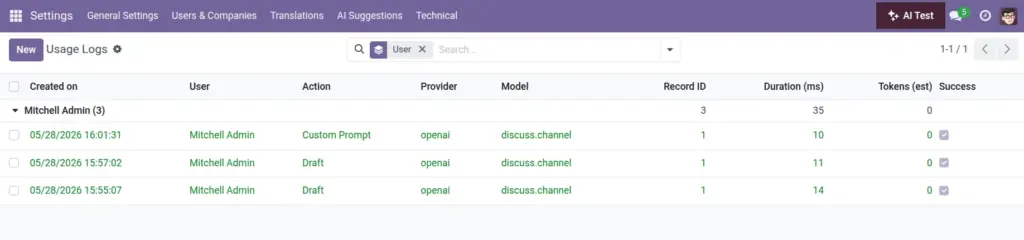
Overview
Usage Logs give managers clear visibility of every AI interaction. You’ll see who requested help, which action and provider were used, how long it took, and whether it succeeded—so you can guide adoption and troubleshoot quickly.
- Adoption: Track which teams rely on AI most.
- Quality: Spot failures and slow responses by provider.
- Compliance: Keep an auditable trail for reviews.
Real‑life example: A spike in failed “Rewrite” actions with one provider points to a temporary outage—switch providers or retry later.
How It Works
- Each AI call creates a log entry.
- Use filters for Success/Errors and Provider.
- Optional payloads appear if debug logging is enabled.
Step-by-Step Guide
- Open Usage Logs from the AI menu (manager only).
- Filter by user, action, or provider.
- Open a log to view details and payload (if recorded).
Fields Table
| Field Name | Description | Example | Use Purpose |
|---|---|---|---|
User |
Who triggered the action |
John Doe |
See who is using AI and how often |
Action |
What was requested |
draft, rewrite, summarize, subject, custom_mail_template |
Analyze feature adoption |
Provider |
AI provider used |
openai |
Compare quality and latency |
Model |
Odoo model involved |
sale.order |
Understand business context of usage |
Record |
Record ID |
42 |
Trace back to the exact document |
Duration (ms) |
Time taken |
980 |
Track performance over time |
Tokens |
Estimated token use |
350 |
Estimate cost and set budgets |
Success |
Outcome flag |
True |
Filter failures for troubleshooting |
Payload (debug) |
Debug content (if enabled) |
Request/response JSON |
Deep‑dive investigations (staging only) |
Field name explanation
User
Who initiated the AI action.
Action
Draft, Rewrite, Summarize, Subject, or Template.
Provider
Which AI service handled the request.
Model
The Odoo document type involved.
Record
The specific document ID.
Duration (ms)
How long the request took.
Tokens
Estimated size/cost of the exchange.
Success
Whether it worked or failed.
Payload (debug)
Request/response body available only with logging on.
Tips
- Group by Provider to compare performance.
- Export logs if auditors request evidence.
Common Mistakes
- Leaving debug payload logging on in production.
- Ignoring spikes in tokens or latency.
Image