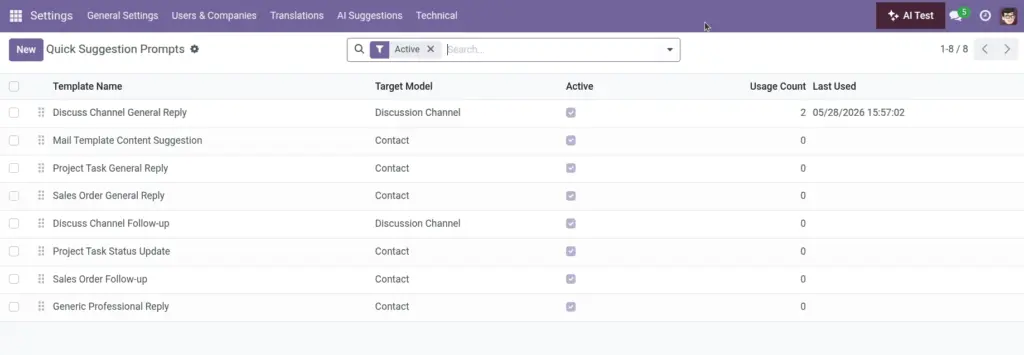
Overview
Quick prompts are light, action‑oriented instructions that power the one‑click buttons users see in the composer. They deliver instant drafts for common scenarios, while managers keep tone and scope under control.
- Model targeting: Show prompts only where they make sense.
- Short & clear: Minimal text that the assistant expands with context.
- Measurable: Usage metrics highlight top performers.
Real‑life example: A “Thank you + next step” prompt helps sales send quick, consistent follow‑ups after a demo.
How It Works
- Create prompts for a specific model (e.g., res.partner, sale.order) or use fallbacks.
- The system picks the best prompt based on the current model.
- Usage counts help you measure what works.
Step-by-Step Guide
- Go to Quick Suggestion Prompts.
- New → Name, Target Model, Sequence, Active.
- Describe the prompt and add placeholder variables as needed.
- Save and test from a real record.
Fields Table
| Field Name | Description | Example | Use Purpose |
|---|---|---|---|
Label |
Button label / template name |
“Polite apology” |
Display text on the quick button |
Target model |
Odoo model for this button |
res.partner |
Restrict where the button appears |
Prompt text |
Instruction the AI follows |
Use {{partner_name}} |
Define what the assistant should do |
Active |
Enable/disable |
True |
Show or hide the button |
Order |
Ordering priority |
10 |
Place frequently used buttons first |
Notes |
Internal guidance |
Tone and guardrails |
Help curators align on intent |
Times used |
How often used |
134 |
Measure adoption and impact |
Last used |
Most recent use |
2026-04-02 10:12 |
Spot stale or seasonal prompts |
Field name explanation
Label
Text shown on the quick action button.
Target model
Where this button should appear (e.g., Customer).
Prompt text
The instruction the assistant expands.
Active
Show or hide the button.
Order
Position among other quick buttons.
Notes
Internal guidance for curators.
Times used
Popularity to track adoption.
Last used
Helps spot items to refresh or retire.
Tips
- Use simple, action-led language (“Draft a brief apology…”).
- Monitor usage counts to improve or retire prompts.
Common Mistakes
- Overloading prompts with too many specifics.
- Forgetting to bind a relevant model.
Image