Overview
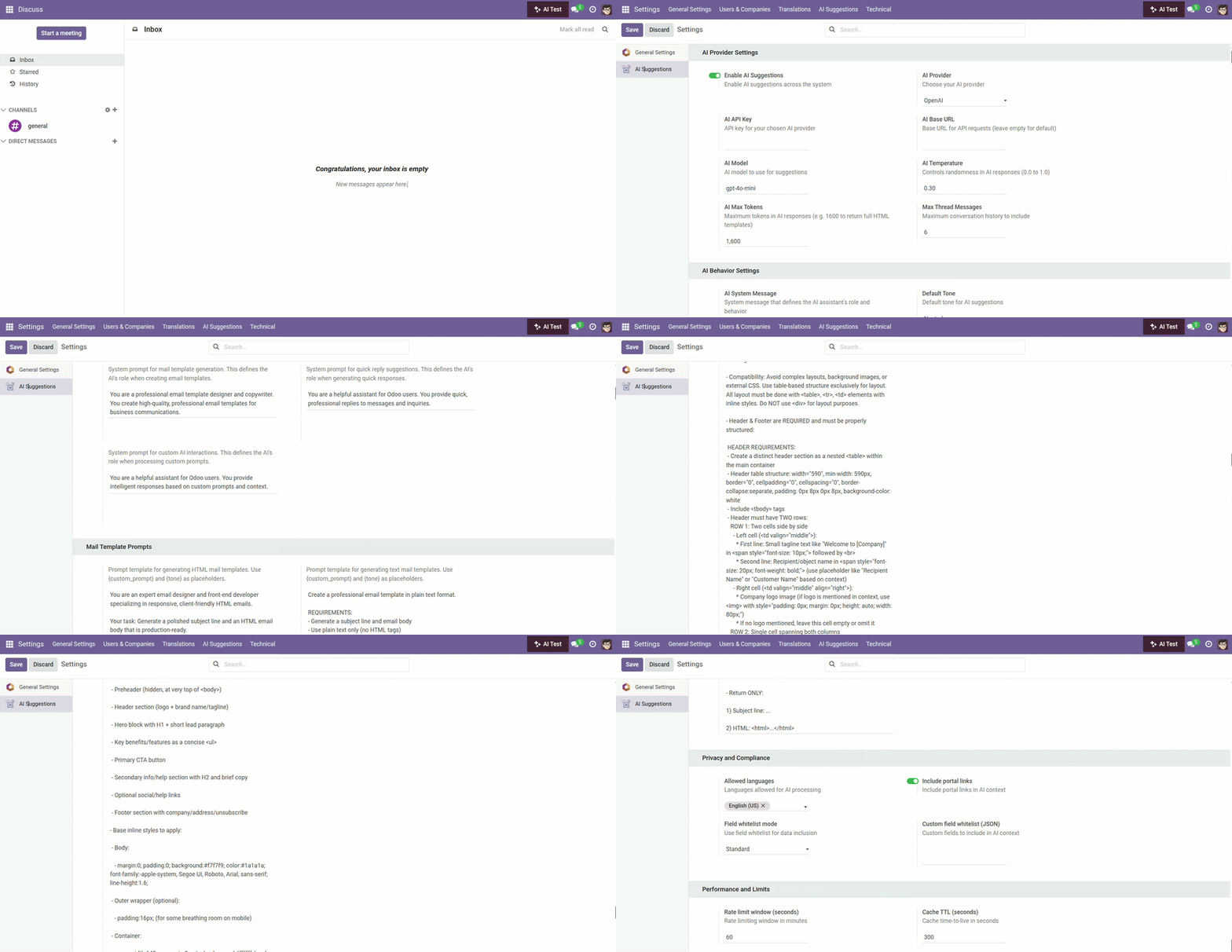
From Settings → AI Suggestions, you enable the assistant, choose your AI provider, set credentials, and tune behavior. You can also configure privacy controls and performance limits to match your company policy.
- Provider choice: OpenAI, Azure, Vertex, Anthropic, Cohere, OpenRouter, or custom.
- Behavior tuning: Default tone, max tokens, and history depth.
- Privacy & safety: Redaction, field whitelists, allowed languages.
Real‑life example: In production, keep redaction on and set reasonable token limits; in staging, temporarily enable payload logging to diagnose formatting issues.
How It Works
- Turn AI on/off globally.
- Enter API credentials and choose a model.
- Enable safety features like PII redaction and field whitelists.
Step-by-Step Guide
- Open Settings → AI Suggestions.
- Enable AI, select a provider, and paste your API key.
- Pick a default tone and set token/message limits as needed.
- Save and test from a record’s chatter.
Fields Table (Settings extensions)
| Field Name | Description | Example | Use Purpose |
|---|---|---|---|
Enable AI |
Master on/off for AI |
True |
Control rollout in one switch |
AI provider |
AI service to use |
openai |
Select backend for responses |
API key |
Secret key for provider |
•••••••• |
Authenticate API calls securely |
Base URL |
Custom endpoint (optional) |
https://api.example.com |
Point to self-hosted/proxy endpoints |
Model |
Model name |
gpt-4o-mini |
Choose capability vs. cost |
Temperature |
Creativity level |
0.3 |
Control variation in outputs |
Max tokens |
Response length cap |
1600 |
Allow full emails or concise replies |
Max messages |
History depth |
6 |
Balance context with speed/cost |
Default tone |
Fallback tone |
neutral |
Keep a consistent voice |
Enable redaction |
Mask sensitive info |
True |
Reduce PII in provider traffic |
Daily limit per user |
Per-user quota |
500 |
Prevent abuse and manage spend |
Debug payload logging |
Debug logging (use sparingly) |
False |
Inspect payloads in staging only |
Allowed languages |
Permitted locales |
en_US, fr_FR |
Enforce language policy |
Cache TTL (seconds) |
Cache reuse window |
300 |
Speed up repeated requests |
Rate limit window (seconds) |
Rate-limit window (sec) |
60 |
Smooth peak usage |
Include portal links |
Share portal URLs |
True |
Add helpful links in replies |
Field whitelist mode |
Data sharing mode |
standard/strict/custom |
Control what data can be sent |
Custom field whitelist |
JSON of allowed fields |
{“sale.order”: [“name”,”amount_total”]} |
Tightly scope sensitive models |
System message |
Global AI persona |
“Helpful assistant…” |
Guide tone across features |
System prompt (Mail template) |
System prompt for templates |
Specialized guidance |
Ensure compliant, full HTML emails |
System prompt (Quick reply) |
System prompt for quick replies |
Support tone |
Keep short replies crisp |
System prompt (Custom) |
System prompt for custom |
General guidance |
Handle bespoke requests safely |
HTML template prompt |
HTML template prompt |
Includes JSON requirements |
Produce valid, branded HTML |
Text template prompt |
Plaintext template prompt |
JSON body_html mapping |
Ensure text templates are compatible |
Field name explanation
Enable AI
Master switch to turn features on or off.
AI provider
Which backend generates the responses.
API key
Credentials used to call the provider.
Base URL
Custom endpoint for proxies or self‑hosting.
Model
The specific LLM to use (capability vs. cost).
Temperature
How much creativity to allow.
Max tokens
Caps response length.
Max messages
How much recent history is included.
Default tone
Fallback voice if none is chosen.
Enable redaction
Hide PII before sending content.
Daily limit per user
Quota per person, per day.
Debug payload logging
Capture payloads (staging only).
Allowed languages
Locales you permit for responses.
Cache TTL (seconds)
Reuse identical results briefly.
Rate limit window (seconds)
Throttle to prevent bursts.
Include portal links
Add helpful links in replies.
Field whitelist mode
Standard/Strict/Custom data sharing.
Custom field whitelist
JSON list of allowed fields.
System message
Global persona for the assistant.
System prompt (Mail template/Quick reply/Custom)
Specialized guardrails.
HTML/Text template prompts
Reusable prompts for email templates.
Tips
- Test in staging with payload logging temporarily on.
- Set max tokens ≥1600 for full HTML templates.
Common Mistakes
- Leaving debug logging on in production.
- Using a model name your provider doesn’t support.
Image