Overview
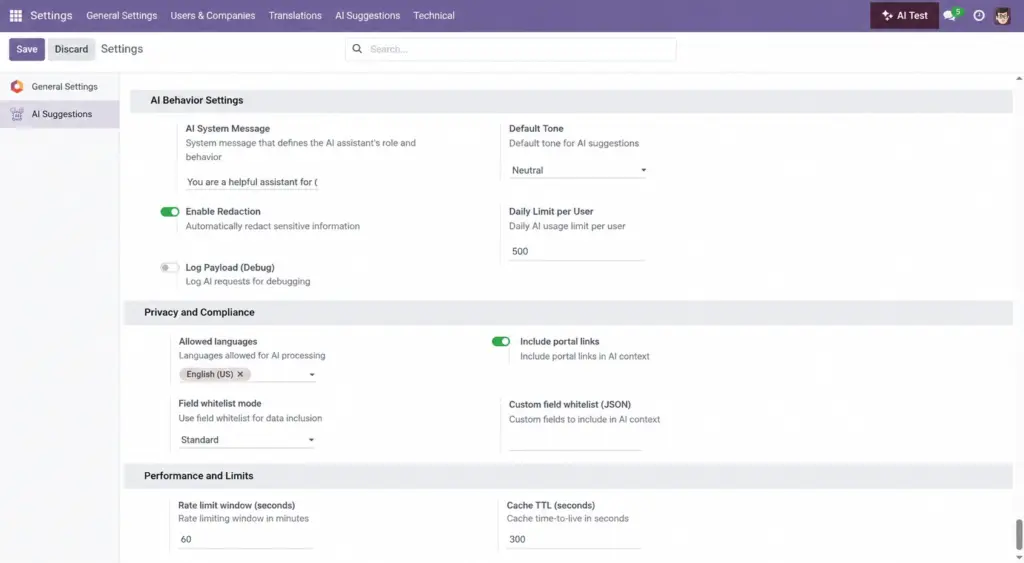
Safety is built in. You can redact sensitive details, share only approved fields, control request volumes, and keep a history of AI usage. This reduces risk while keeping the assistant helpful and fast.
- Redaction: Hide PII before sending content to providers.
- Field whitelists: Share only the data needed for good answers.
- Limits: Set daily caps and cooling windows to prevent abuse.
Real‑life example: For finance records, use Strict or Custom whitelist so only invoice totals and due dates are shared, never full payment details.
How It Works
- Redaction: Masks PII before sending to providers.
- Field whitelist mode: Limit which fields are shared.
- Rate limits: Control request volume per user.
- Logs: Keep records for auditing.
Step-by-Step Guide
- In Settings, enable Redaction.
- Choose Standard, Strict, or Custom whitelist mode.
- Optionally add a custom whitelist JSON for sensitive models.
- Set daily and time‑window limits that match your policy.
Fields Table (Key safety settings)
| Field Name | Description | Example | Use Purpose |
|---|---|---|---|
Enable redaction |
Mask sensitive content |
True |
Reduce exposure of PII |
Field whitelist mode |
Data sharing level |
strict |
Control which fields can be sent |
Custom field whitelist |
JSON list of allowed fields |
{“res.partner”:[“name”,”email”]} |
Fine‑tune for sensitive models |
Rate limit window (sec) |
Rate-limit window (sec) |
60 |
Prevent bursts and misuse |
Daily limit per user |
Daily cap per user |
500 |
Budget daily usage per user |
Field name explanation
Enable redaction
Turn on masking for emails, phones, and secrets.
Field whitelist mode
Choose Standard, Strict, or design Custom rules.
Custom field whitelist
Explicit list of allowed fields per model.
Rate limit window (sec)
Control request frequency.
Daily limit per user
Cap total daily usage for each person.
Tips
- Review whitelists with your security team.
- Use different settings for staging vs production.
Common Mistakes
- Turning on payload logging in production.
- Sharing fields not needed for the answer.
Image