Overview
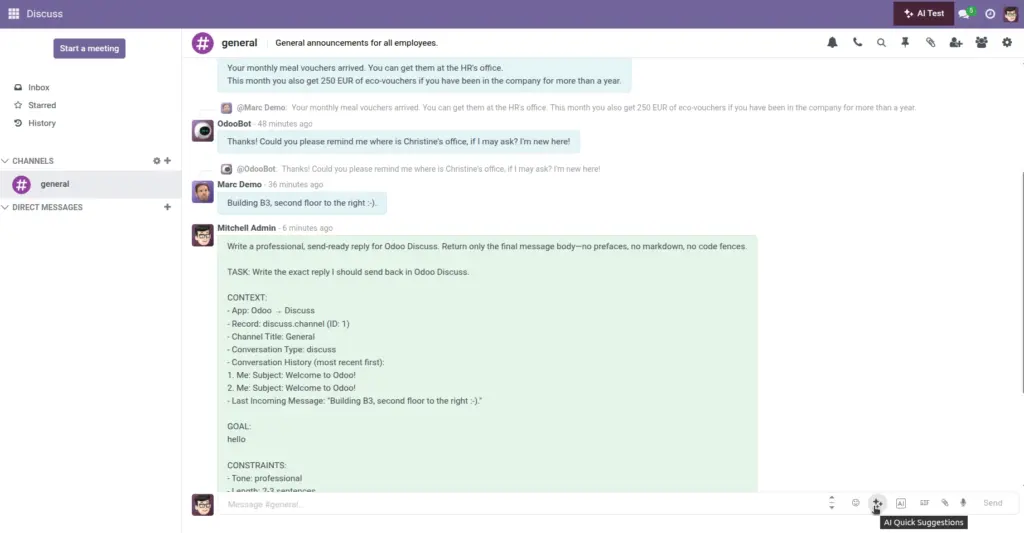
Quick buttons are one‑click starters prepared by your managers. Each button has a short instruction (prompt). When you click it, the assistant blends that instruction with the latest messages and the current record to produce a ready‑to‑edit draft.
- Fast: No typing required—great for busy inboxes.
- Consistent: Everyone replies with the same tone and structure.
- Contextual: Customer names, amounts, and dates are considered.
Real‑life example: Click “Polite apology” on a delayed order. The assistant drafts a brief apology that references the order and sets expectations for the new delivery date.
How It Works
- Choose a button (e.g., “Polite apology”).
- The AI blends it with recent messages and the current record.
- The result appears in your editor, ready to review.
Step-by-Step Guide
- Open a record with chatter/email.
- Click a quick suggestion button.
- Adjust tone if offered, then review and send.
Fields Table
| Field Name | Description | Example | Use Purpose |
|---|---|---|---|
Prompt |
Short instruction behind the button |
“Polite apology about delay” |
Produce a fast, consistent draft |
Where it appears |
Target area for this button |
Sales Order |
Show the right buttons in the right places |
Times used |
How often it’s used |
134 |
Identify popular prompts to standardize |
Field name explanation
Prompt
The short instruction the assistant expands into a draft.
Where it appears
The area or document type where this button is shown.
Times used
How often teammates clicked this button (helps prioritize).
Tips
- Use quick buttons for routine replies to save time.
- Switch the tone to match the situation.
Common Mistakes
- Sending without checking customer names.
- Using a prompt outside the right model.
Image