Overview
This app adds practical AI to everyday Odoo work. You’ll see new buttons in chatter, Discuss, and email templates that help you write faster and with more confidence—without leaving your current screen.
- Where it appears: Chatter panels, Discuss channels, and mail templates.
- What it helps with: Drafting, rewriting, summarizing, subjects, and full templates.
- Who manages it: Your admins choose the provider, safety rules, and prompts.
Real‑life example: Open a Sales Order, click the AI button in chatter, and get a clear customer update based on that order’s details—ready to send.
How It Works
Buttons appear in the composer (mail/chatter). The app reads the current record and recent messages to give better suggestions. Managers can control providers, safety, and prompts.
Step-by-Step Guide
- Install the module from Apps. If you need a full walkthrough (download, server folder, restart, Apps list, access rights), open Setup AI Assistant.
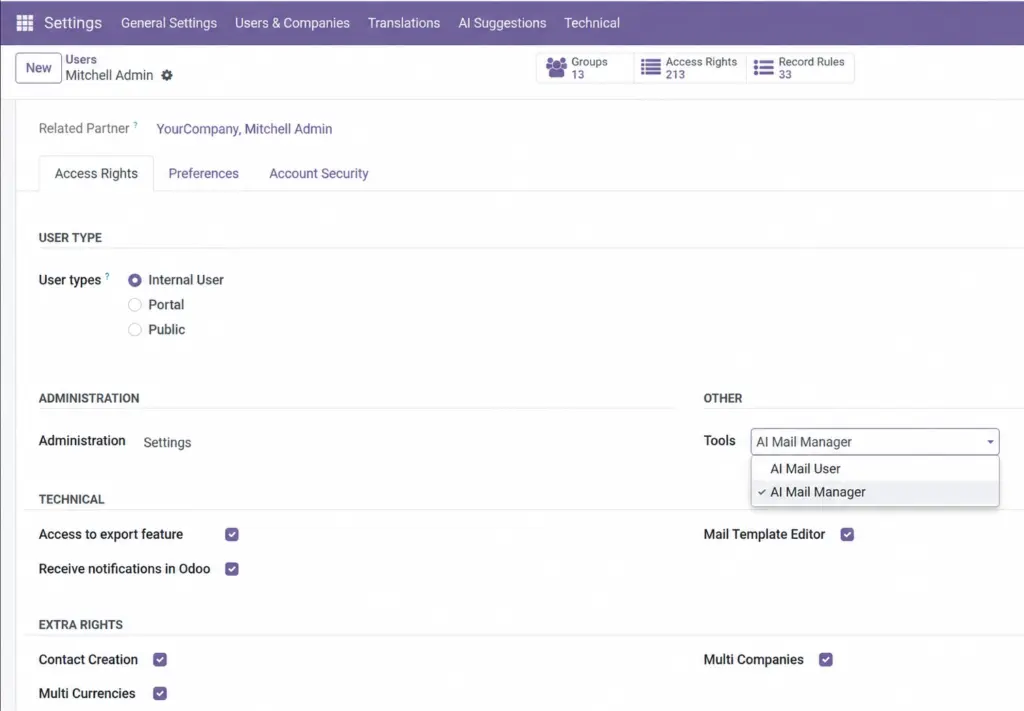
- Give users the “AI Mail User” role (and “AI Mail Manager” for admins).
- Open Settings → AI Suggestions to select a provider and add your key.
- Open any record’s chatter and click the AI buttons to draft or summarize.
Fields Table
Key data points used across the app.
| Field Name | Description | Example | Use Purpose |
|---|---|---|---|
Record context |
Live data from the open document |
Sales Order SO034 |
Personalize replies with names, dates, amounts |
Conversation history |
Recent messages for tone and facts |
Last 3–10 messages |
Keep answers on-topic and consistent |
Tone |
Style for the reply |
Professional |
Match brand voice without rewriting manually |
Field name explanation
Record context
The document you’re working on (e.g., Order, Invoice).
Conversation history
Recent messages the assistant considers.
Tone
The voice/style the message should use.
Tips
- Be clear about what you want (e.g., “Short apology with delivery ETA”).
- Pick a tone that suits your brand.
- Always review the draft before sending.
Common Mistakes
- Forgetting to grant user roles.
- Using an expired API key.
- Editing placeholders out of email templates.
Image