Overview
Why it matters: Payroll and salary data are sensitive. Role-based access ensures staff only see their own payslips and bank details while HR and payroll teams can configure rules and run batches—reducing fraud risk and accidental data leaks.
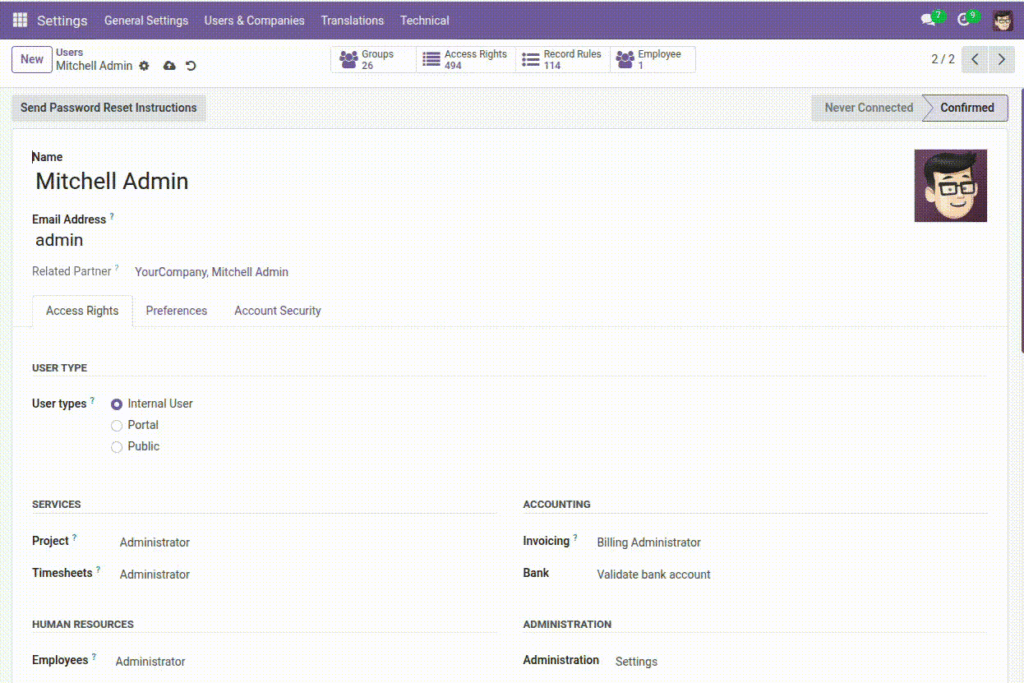
What this covers: Advance HR uses Odoo groups (e.g. User vs Administrator in the Advance HR category). Assign groups under Settings → Users. Permissions cover salary entries, bank accounts, documents, payslips, tax schemes, and more; some actions (approve, print) are limited by role.
Apply the least privilege needed: grant payroll configuration only to people who run pay, not to every HR generalist unless policy requires it.
How It Works
Each role grants permissions on specific areas like Employees, Bank Details, Documents, Payroll Groups, Salary Structures, Overtime Policies, Tax Schemes, and Payslips. Permissions are usually: Read (view), Create, Write (edit), and sometimes special buttons like Approve or Print.
Step-by-Step Guide
- Open Settings → Users & Companies → Users.
- Select the user and assign the appropriate HR/Payroll roles.
- Save. The user will see menus and actions based on assigned roles.
- Test with that user (or ask them) to confirm they can access what they need—and nothing more.
Fields Table
| Role Name | Description | Example |
|---|---|---|
Employee (Basic Access) |
Can see their own details and limited HR menus as allowed by company policy. |
View own profile and payslip PDF. |
HR Officer |
Manages employee records, bank accounts, and documents. |
Create employee bank account; upload ID documents. |
Payroll Manager |
Sets payroll groups, tax schemes, salary structures, runs payslip wizards. |
Generate monthly payslips; configure earnings/deductions. |
HR Administrator |
Full access to HR configuration, dashboards, and reports. |
Edit overtime policy; adjust holiday rules. |
Field labels explained
Advance HR
uses Odoo groups; exact names may match your database.
Employee (Basic Access)
End-user visibility: typically own employee record, own payslips when paid, limited menus—no payroll configuration.
HR Officer
Operational HR: maintain employee data, banks, documents, often initiate requests without full tax/salary admin.
Payroll Manager
Runs pay cycles: salary entries, payslip wizard, tax links—may exclude pure IT or recruitment admin if split.
HR Administrator
Broad configuration: policies, groups, schemes, dashboard widgets—should be a small trusted group.
Assigning groups on the user form
Under Settings → Users, the Access Rights tab lists groups; implied groups may auto-add base HR access.
Tips
- Assign the lowest role that still lets the person do their job.
- Review access when someone changes department or responsibility.
Common Mistakes
- Giving admin rights to users who only need to view or update records.
- Not removing old access when a staff member moves out of payroll duties.