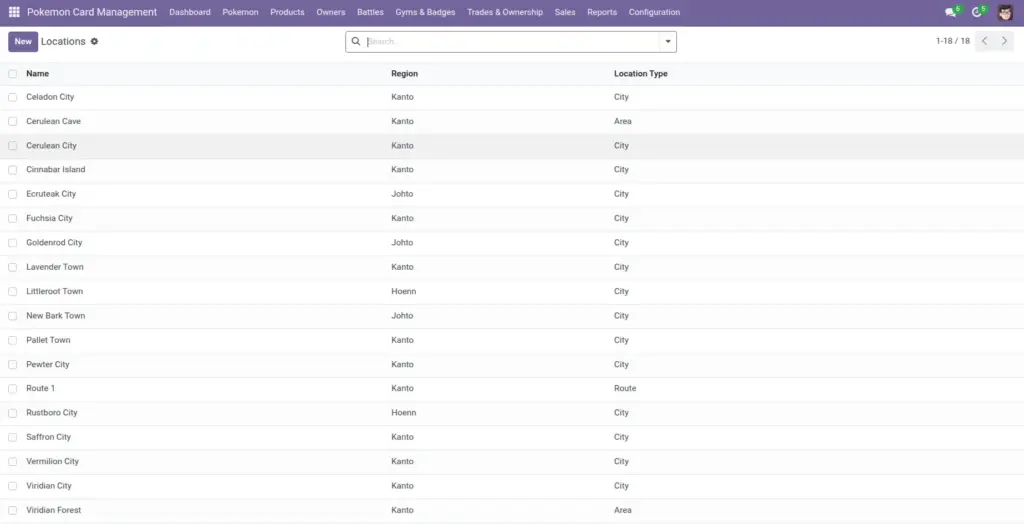
Locations are reusable “capture places” you select on Pokemon records. They help you answer questions like: “Where did we capture this Pokemon?” and “Which Pokemon came from this region?”
1) Overview
Go to Configuration → Locations to manage locations. Then, on a Pokemon record, you can select a Capture Location.
- Location Name
- Region
- Location Type
- Description
2) How it works
Reusable choices
Locations are selected from a list. This is faster and more consistent than typing a free-text place name every time.
Why it matters: Your reports stay clean (no “Viridian Forest” vs “Veridian Forest” typos).
Location types
Location Type helps categorize places (City, Route, Area, Gym, Other). Use it for quick filtering and organization.
Tip: keep types simple; pick “Other” when unsure
3) Step-by-step guide
- Open Configuration → Locations and click Create.
- Enter the Location Name.
- Optional: enter the Region.
- Select Location Type (City/Route/Area/Gym/Other).
- Optional: add a Description (helpful notes).
- Save.
- Go to a Pokemon and set Capture Location to this location.
Tip: Create locations for your most common areas first, then expand as needed.
4) Fields table
| Field Name | Description | Example |
|---|---|---|
Location Name |
The place name users select on Pokemon records. |
Viridian Forest |
Region |
Optional higher-level area name. |
Kanto |
Location Type |
Category for sorting and filtering locations. |
Area |
Description |
Optional notes about the location. |
“Good for Bug types.” |
5) Field name explanation
Location Name
Use the name people say out loud. Keep it consistent and easy to search.
Example: “Cerulean City”, not “Cerulean”.
Region
Helps group locations under the same world/area.
Example: Region = “Johto” for multiple cities and routes.
Location Type
A simple category. Use it to keep the list tidy.
Example: Set “Gym” for places used as gyms.
Capture Location (on Pokemon)
This is where you choose the location for a Pokemon’s capture/arrival.
Example: “Captured Today” + Capture Location helps review event results.
6) Tips
- Create a short standard list rather than hundreds of rarely-used locations.
- Use Region for reporting: it becomes a quick way to answer “Where are most captures coming from?”
- Use Description for internal notes like special rules for a location or event.
7) Common mistakes
- Duplicate locations with different spelling: users end up selecting the wrong one.
- Using “Other” for everything: you lose the benefit of filtering. Use City/Route/Area/Gym where possible.
- Not updating Capture Location: if you migrate old records, leaving it blank reduces reporting value.
8) Image