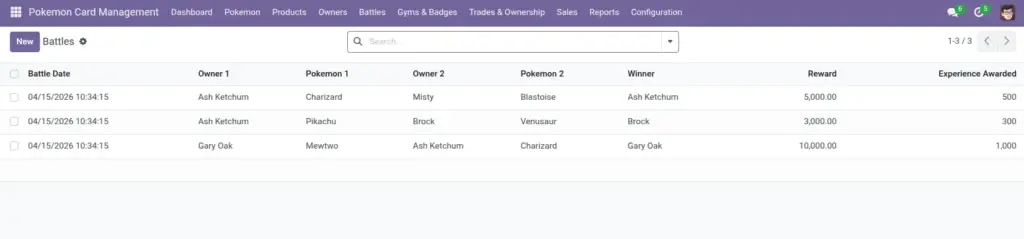
Record battles between two owners, select each owner’s Pokemon for the match, choose a winner, and optionally award a reward and experience. Awarded experience can trigger level‑ups for the winning Pokemon.
1) Overview
Go to Battles → Battles to create a battle record. Go to Battles → Battle History to view battles where a winner is set. Reports can also group battles for statistics.
- Battle Date
- Winner
- Experience Awarded
- Reward
2) How it works
Owner → Pokemon selection
When you pick Owner 1, the Pokemon 1 list is filtered to show only Pokemon owned by that owner. The same applies to Owner 2 and Pokemon 2.
Why it matters: This prevents accidentally selecting a Pokemon that belongs to the wrong owner.
Awarding experience
If you set a Winner and enter Experience Awarded, the winner’s Pokemon gains that experience. When enough experience is reached, the Pokemon can level up.
Tip: use consistent experience values so leveling feels fair
3) Step-by-step guide
- Go to Battles → Battles and click Create.
- Select Owner 1 and then choose Pokemon 1 (filtered to that owner).
- Select Owner 2 and then choose Pokemon 2.
- Set Battle Date (defaults to now).
- Choose the Winner (Owner 1 or Owner 2).
- Optional: add Reward (money or points) and Experience Awarded.
- Add Battle Notes if you want context (e.g., “final round, close match”).
- Save.
Suggested habit: Always add at least one line of Battle Notes for important matches—it makes reports meaningful.
4) Fields table
| Field Name | Description | Example |
|---|---|---|
Owner 1 |
First trainer in the battle. Must be different from Owner 2. |
Brock |
Pokemon 1 |
Pokemon used by Owner 1 (filtered to their owned Pokemon). |
Onix |
Owner 2 |
Second trainer in the battle. |
Ash |
Pokemon 2 |
Pokemon used by Owner 2 (filtered to their owned Pokemon). |
Pikachu |
Winner |
The winning owner (optional, but required for “Battle History”). |
Ash |
Battle Date |
When the battle happened. |
2026‑04‑06 14:30 |
Reward |
Optional reward value. |
$10.00 |
Experience Awarded |
Experience given to the winner’s Pokemon. |
200 |
Battle Notes |
Free text notes about the battle. |
“Used Rock Slide to finish.” |
5) Field name explanation
Owner 1 / Owner 2
These must be two different owners. This keeps battles meaningful and avoids self‑matches.
Example: If you select the same owner twice, the system blocks saving.
Pokemon 1 / Pokemon 2
The Pokemon are filtered by owner so you can only select Pokemon that belong to each owner.
Example: After selecting Owner 1, you’ll only see that owner’s Pokemon in Pokemon 1.
Winner
Select which owner won. This helps with history, reporting, and rankings.
Example: Winner = Owner 1.
Battle Date
When the battle happened. Useful for grouping and “today” filters.
Example: 2026‑04‑06 14:30.
Reward
Optional reward amount you track for the battle (money/points depending on your process).
Example: $10.00.
Experience Awarded
Adds experience to the winning Pokemon so level progression is reflected in your collection.
Example: Give 150 XP for a normal battle, 300 XP for a tournament match.
Battle Notes
A short explanation of what happened, useful for later review.
Example: “Close match, decided by one move.”
Battle History
This view shows battles where a winner is set—useful for reporting and rankings.
Example: If Winner is empty, the battle may not appear in Battle History.
6) Tips
- Use Winner consistently: set a winner when the result is known, so Battle History stays useful.
- Standardize experience: agree on a simple XP rule (e.g., 100 for friendly, 200 for league, 300 for finals).
- Use “Group By Winner” in search to quickly see who’s winning most.
- Keep notes short but clear: one or two sentences are usually enough.
7) Common mistakes
- Picking the same owner twice: the system will stop you. Choose two different owners.
- Leaving Winner blank for completed battles: Battle History and stats become incomplete.
- Using wrong Pokemon: if an owner recently changed (trade/sale), refresh the battle form and re‑select.
8) Image