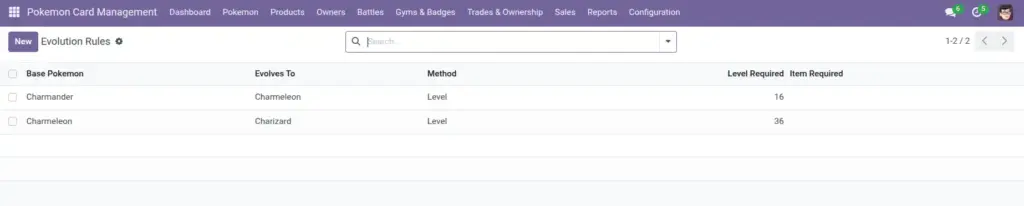
Evolution rules let you define when a Pokemon can evolve (for example, at a certain level). These rules support level, item, trade, and happiness methods.
1) Overview
Go to Configuration → Evolution Rules to create a rule from a base Pokemon to the Pokemon it evolves into. This is a “rulebook” for your team so evolution decisions are consistent.
- Base Pokemon
- Evolves To
- Method
- Level / Item / Happiness
Good to know: In this module, leveling up is driven by experience. When a Pokemon levels up, the system can check evolution rules for level-based evolutions.
2) How it works
Methods
Each rule has a Method. Depending on the method, only certain fields are needed:
- Level: use Level Required
- Item: use Item Required
- Happiness: use Happiness Required
- Trade: no extra requirement fields
Why rules help
Even if you don’t “auto-evolve” in the app, rules act as a consistent reference so every staff member follows the same standard.
Tip: agree on one evolution policy across your team
3) Step-by-step guide
- Open Configuration → Evolution Rules and click Create.
- Select the Base Pokemon (the one that evolves).
- Select Evolves To (the result).
- Choose the Method (Level, Item, Trade, Happiness).
- Fill the requirement field that matches the method (for example, Level Required).
- Save.
Recommended: Create evolution rules before you run a big battle event—then everyone can check the same reference quickly.
4) Fields table
| Field Name | Description | Example |
|---|---|---|
Base Pokemon |
The Pokemon that can evolve. |
Charmander |
Evolves To |
The Pokemon it becomes. |
Charmeleon |
Method |
How the evolution happens (Level, Item, Trade, Happiness). |
Level |
Level Required |
Required if Method is Level. |
16 |
Item Required |
Required if Method is Item. |
Fire Stone |
Happiness Required |
Required if Method is Happiness. |
220 |
5) Field name explanation
Base Pokemon
The starting Pokemon. Think: “What do we have now?”
Example: Base Pokemon = “Eevee”.
Evolves To
The result after evolution. Think: “What does it become?”
Example: Evolves To = “Vaporeon”.
Method
Controls which requirement field matters. Pick the method first.
Example: If Method = Item, fill Item Required and ignore Level Required.
Level Required
The level where evolution becomes allowed (based on your organization’s rules).
Example: “Evolves at Level 16”.
Item Required
The item name your team uses to allow evolution.
Example: “Water Stone”.
Happiness Required
A numeric threshold you choose for happiness-based evolutions.
Example: “Evolves when happiness is 220 or more”.
6) Tips
- Write item names consistently: decide “Fire Stone” vs “FireStone” and stick with one.
- Start with level evolutions: they’re the most common and easiest to maintain.
- Review after events: if your policy changes, update rules right away so future decisions match the new policy.
7) Common mistakes
- Choosing the wrong method: if you select Item but fill Level Required, your rule becomes confusing.
- Leaving requirement empty: rules become unclear. Always fill the relevant requirement field.
- Creating duplicate rules: before creating, search for the base Pokemon to avoid two conflicting rules.
8) Image