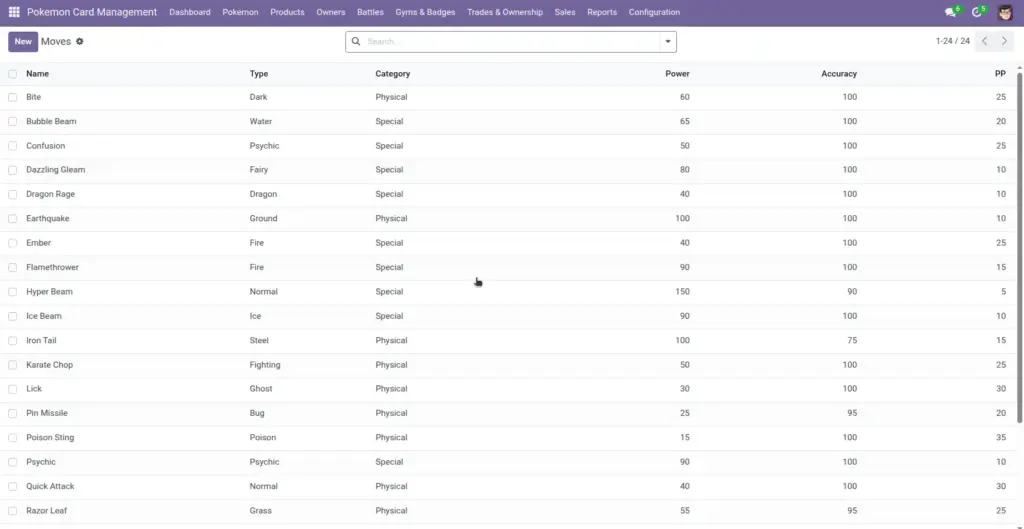
The Moves library is your master list of moves (like “Thunder Shock”). Once created, moves can be assigned to Pokemon as “learned moves” with the level learned and PP details.
1) Overview
Go to Configuration → Moves to create and maintain the move list. Moves have a type, category, and simple stats (power, accuracy, PP).
- Type
- Category
- Power / Accuracy / PP
2) How it works
One clean list for the whole team
Moves are shared. When you edit the move details (like PP), any Pokemon using that move benefits from the same definition.
Why it matters: You avoid “Thunder Shock” being written three different ways in different Pokemon records.
Learned moves on Pokemon
On a Pokemon record, learned moves include the Level Learned and PP values. PP Remaining starts at the move’s PP Max (based on the move).
Tip: set PP on the move before assigning it to many Pokemon
3) Step-by-step guide
- Open Configuration → Moves and click Create.
- Enter the Move Name (unique).
- Select the Type (from Pokemon Types).
- Select the Category: Physical, Special, or Status.
- Optional: fill Power, Accuracy, and PP.
- Add a Description in simple words (helps users choose the right move).
- Save.
Next step: Assign the move to a Pokemon in Pokemon → Abilities & Moves.
4) Fields table
| Field Name | Description | Example |
|---|---|---|
Move Name |
The move’s display name. Must be unique. |
Thunder Shock |
Type |
The move’s type, used for filtering and consistency. |
Electric |
Category |
Physical, Special, or Status. |
Special |
Power |
Optional strength value for the move. |
40 |
Accuracy |
Optional hit chance as a percent (0–100). |
100 |
PP |
How many times the move can be used before needing a reset/recovery. |
30 |
Description |
Free text explanation of what the move does. |
“A small jolt of electricity.” |
5) Field name explanation
Move Name
The name people search and select on Pokemon. Keep spelling consistent across the team.
Example: “Thunder Shock”.
Type
Connects the move to your Type list so your data stays consistent.
Example: “Water Gun” → Type = Water.
Category
A simple label to group moves. It helps searching and filtering, even if you don’t simulate battles.
Example: Filter moves by “Status” to find support moves.
Power
Optional strength value. Use it if your organization compares moves by stats.
Example: Power 40.
Accuracy
A helpful reference value. Keep it consistent if your organization uses move stats for training or events.
Example: 85 for a risky move, 100 for a reliable one.
PP
Used to set PP Max for learned moves on Pokemon. PP Remaining starts from this value.
Example: If PP is 25, learned moves show PP Max = 25.
Description
Short human-friendly explanation of what the move does.
Example: “A small jolt of electricity.”
6) Tips
- Write descriptions for humans: short, clear sentences help non‑technical users pick the right move.
- Keep names unique and standard: decide on spelling and avoid duplicates like “ThunderShock”.
- Use filters: the move search includes quick filters for Physical, Special, Status.
7) Common mistakes
- Creating duplicate moves: the system blocks exact duplicates, but “Thunder Shock” vs “ThunderShock” can still happen if you’re not careful.
- Leaving PP empty: learned moves may show PP Max as 0. Decide whether PP is important for your process.
- Wrong type: if the type is wrong, your reports and tags become misleading.
8) Image