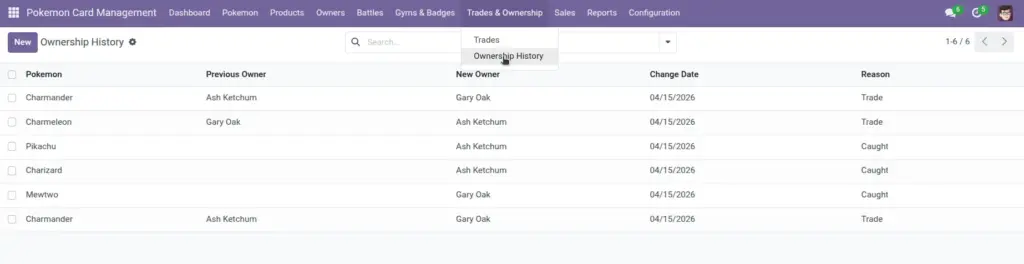
Use trades when two customers swap Pokemon. The module automatically updates Pokemon ownership and records an ownership history entry for both Pokemon.
1) Overview
Go to Trades & Ownership → Trades to record swaps. Go to Trades & Ownership → Ownership History to see a timeline of ownership changes.
- Customer From / To
- Owner From / To (auto)
- Ownership History
Important: Trades start from customers. Owners are found automatically based on the customer linked on the Owner record.
2) How it works
Auto‑finding owners
When you choose Customer From and Customer To, the system searches for the matching Owner records and fills Owner From and Owner To.
Tip: ensure each owner is linked to the right customer
Automatic ownership updates
When you save a trade, the system swaps the owners of the two selected Pokemon and creates history lines showing the “before and after”.
Result: Your Pokemon lists stay accurate without manual re‑assignment.
3) Step-by-step guide
- Go to Trades & Ownership → Trades and click Create.
- Select Customer From (the person giving a Pokemon).
- Check that Owner From fills automatically.
- Select Pokemon Given (filtered to Owner From’s Pokemon).
- Select Customer To (the person giving the other Pokemon).
- Check that Owner To fills automatically.
- Select Pokemon Received (filtered to Owner To’s Pokemon).
- Confirm Trade Date and add Notes (optional).
- Save.
After saving: Open either Pokemon record to see the updated Owner. Open Ownership History to confirm the timeline entry exists.
4) Fields table
Trade
| Field Name | Description | Example |
|---|---|---|
Customer From |
The customer who gives a Pokemon away. |
Ash (Customer) |
Owner From |
The owner linked to Customer From (filled automatically). |
Ash (Owner) |
Pokemon Given |
The Pokemon Customer From gives. |
Pikachu |
Customer To |
The customer who gives the other Pokemon. |
Misty (Customer) |
Owner To |
The owner linked to Customer To (filled automatically). |
Misty (Owner) |
Pokemon Received |
The Pokemon Customer To gives. |
Staryu |
Trade Date |
Date of the trade. |
2026‑04‑06 |
Notes |
Optional context for the trade. |
“Swap for tournament.” |
Ownership History
| Field Name | Description | Example |
|---|---|---|
Pokemon |
The Pokemon whose ownership changed. |
Pikachu |
Previous Owner |
Who owned it before (may be empty in some cases). |
Ash |
New Owner |
Who owns it now. |
Misty |
Change Date |
When the change happened. |
2026‑04‑06 |
Reason |
Why ownership changed (Trade, Caught, Gift, Released). |
Trade |
5) Field name explanation
Customer From / Customer To
The two Odoo customers involved in the trade. They must be different people.
Example: Customer From = Ash, Customer To = Misty.
Owner From / Owner To
These are calculated from the selected customers. They help filter which Pokemon you can choose for each side.
Example: If Owner To is empty, you may not be able to select “Pokemon Received”.
Pokemon Given / Pokemon Received
These are the Pokemon being swapped. The system switches their owners when the trade is saved.
Example: After the trade, Pikachu’s Owner becomes Misty.
Trade Date
The date you want this trade recorded under.
Example: 2026‑04‑06.
Notes
Optional short explanation for why the trade happened.
Example: “Swap for tournament.”
Ownership History
A timeline that answers “who owned this Pokemon before?”. It’s automatically created for trades.
Example: Search history by Pokemon to see all past owners.
Reason
A simple label for the type of change. Trades use “Trade”.
Example: If you later add “Gift” changes, you can filter history by reason.
Previous Owner / New Owner (in Ownership History)
Shows who had the Pokemon before and who has it now.
Example: Previous = Ash, New = Misty.
Change Date (in Ownership History)
When the ownership change was recorded.
Example: Same as the trade date.
6) Tips
- Check Owner links first: if a customer is not linked to an owner, fix the owner record before recording trades.
- Use Notes for why the trade happened—helps when someone asks months later.
- Review Ownership History weekly if you manage many swaps; it helps catch mistakes early.
7) Common mistakes
- Choosing the same customer twice: the system blocks it because trades must be between two different people.
- Customers without linked owners: Owner From/To stays empty and Pokemon selection may not filter correctly.
- Trading the wrong Pokemon: always double‑check the two Pokemon before saving; ownership changes immediately.
8) Image