Understand who can see which export setups, and how to safely share exports with teammates.
Overview
Access & Sharing controls who can see and use export configurations and templates. This matters because exports often include sensitive information (customer details, pricing, payroll, etc.).
Most of the time, exports are private to the person who created them. You can also make an export public for broader use, or share it with specific users. If you “can’t find” an export someone mentioned, it usually means it is private or not shared with you.
Example: A finance export template is shared only with the Finance team, while a standard “Product List” export is public for all users.
How It Works
- Each export setup is owned by the person who created it.
- Depending on settings, an export can be Private, Public, or Shared with specific users.
- Managers typically have wider access (create templates, manage configuration).
Step-by-Step Guide
- Open the export configuration (or template) you want to share.
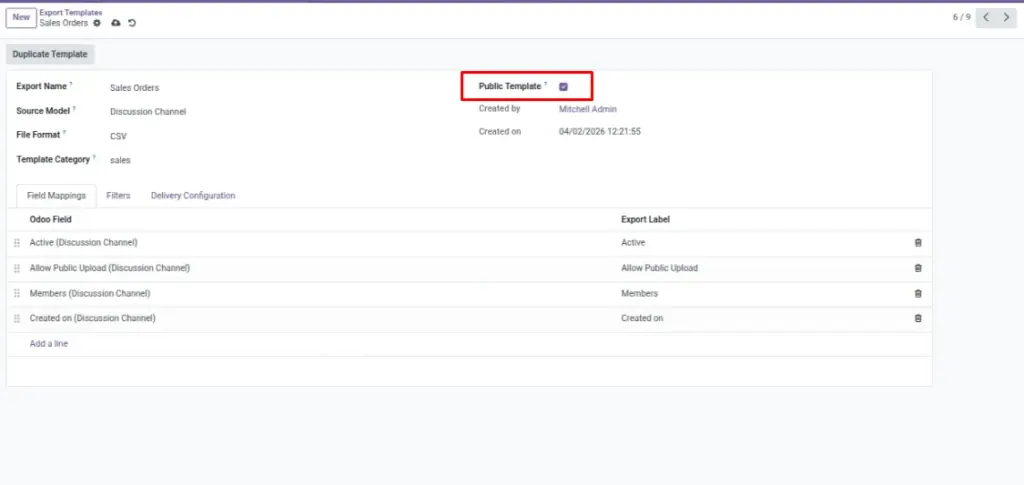
- Look for sharing options such as Public or Allowed Users (wording may vary).
- To share with a teammate, add them to Allowed Users.
- To make it available to everyone with access, enable Public (use carefully).
- Ask an Export Manager if you don’t have permission to change sharing.
Fields Table
| Field Name | Description | Example |
|---|---|---|
Owner (Created By) |
The person who created the export setup. |
Chandrika |
Public |
Anyone with module access can see/use it. |
On |
Allowed Users |
Specific users who can access it. |
Finance Team Users |
Export User |
Basic role to run exports. |
Can export + view logs |
Export Manager |
Advanced role to manage templates and settings. |
Can manage templates |
Field Explanations
Owner (Created By)
The original creator; private exports are usually visible only to them.
Public
Makes the export easy to reuse, but be careful with sensitive columns.
Allowed Users
Safer than public: share only with the people who need it.
Export User
Typical role for day-to-day exporting.
Export Manager
Role for admins/leads who standardize templates and controls.
Tips
- Use Allowed Users for finance or payroll exports.
- Use naming conventions so shared exports are easy to identify.
- Review who has access when team members change roles.
Common Mistakes
- Making an export public without checking the included fields.
- Sharing an export but forgetting to share the related template variant.
- Assuming everyone can see your exports by default.
Image