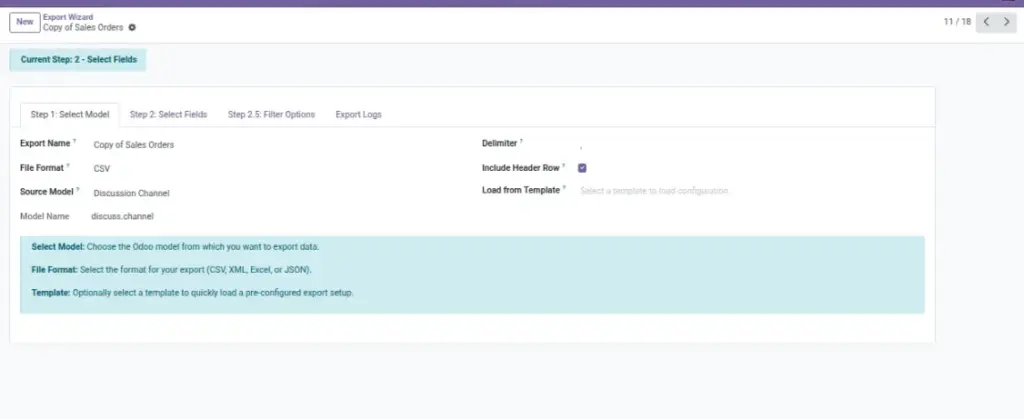
Choose the right format for your audience. Spreadsheet, system integration, or documents — it’s all supported.
Overview
This page helps you choose the best export format and settings so the file opens correctly and can be used immediately by the next person or system.
Formats are for different audiences: Excel/CSV for people working in spreadsheets, PDF for sharing a read‑only document, and JSON/XML for connecting to other software. Choosing the right format reduces rework and avoids “can’t open this file” situations.
Settings (like delimiter, headers, and date format) control how the file looks and how easy it is to import into another tool. If your team uses a specific standard (for example, semicolon-separated CSV), set it here.
Example: You export Products as CSV using semicolon delimiter because your supplier’s import tool requires it.
How It Works
- Select a File Format.
- Adjust format-specific options (delimiter, headers, encoding, etc.).
- Export or schedule the configuration for later.
Step-by-Step Guide
- Open your export configuration.
- Set File Format to CSV, Excel, XML, JSON, PDF, or ODS.
- Configure options (e.g., separator “,” or “;”, include headers, date format).
- Preview again if formatting changes how data looks.
- Click Export or proceed to Delivery.
Fields Table
| Field Name | Description | Example |
|---|---|---|
File Format |
Type of output file. |
CSV, TSV, Excel, XML, JSON, PDF, ODS |
Delimiter/Separator |
For CSV/TSV, choose the column separator. |
Comma “,” or Semicolon “;” |
Include Headers |
Whether to include the first row with column names. |
Yes |
Encoding |
Character set to use in the file. |
UTF-8 |
Date/Number Format |
Adjust for your region or receiving system. |
YYYY-MM-DD; 1,234.56 |
Field Explanations
File Format
CSV/Excel for people; JSON/XML for systems.
Delimiter
Match what your spreadsheet or BI tool expects.
Headers
Keep them on unless a system requires raw values.
Encoding
Use UTF-8 to avoid special-character issues.
Date/Number
Align with regional or integration standards.
Tips
- For Europe, semicolon-separated CSVs may open better in Excel.
- Use Excel (XLSX) when your audience edits the file.
- Use JSON for APIs and technical integrations.
Common Mistakes
- Using comma CSV when the target system expects semicolon.
- Forgetting headers, making columns hard to identify.
- Mixing date formats across exports.
Image