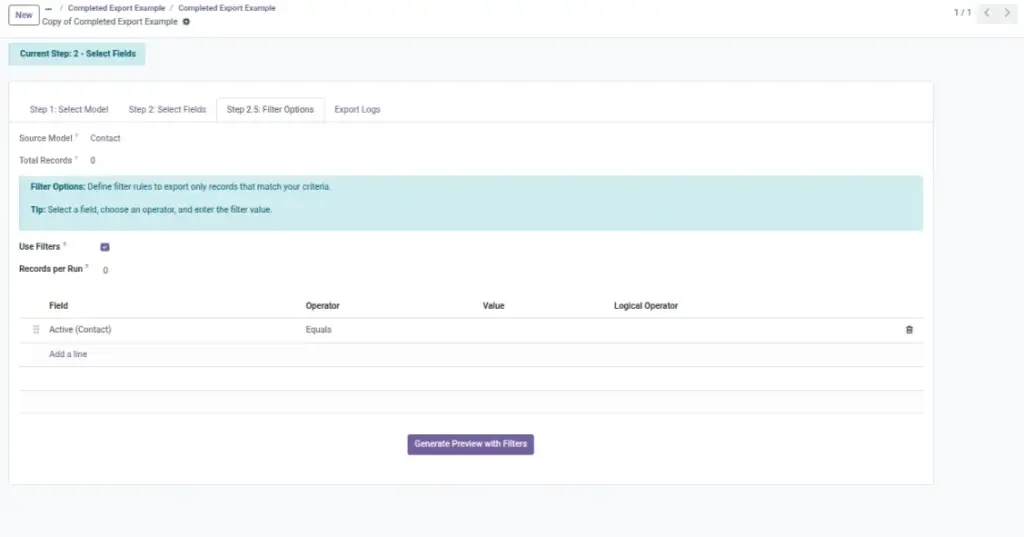
Make the file precise. Apply conditions to include only the right records and preview before you export.
Overview
Filter & Preview is where you make sure your export is exactly what you need — not too big, not missing key rows, and not full of drafts or test records.
Filters let you choose which records are included (for example: “Only Posted invoices”, “Only Confirmed sales orders”, or “Only customers in Chennai”). This keeps your file smaller and more accurate.
Preview shows a small sample of the result using your selected fields and filters. It’s your safety check before exporting a large file or sending it to a customer, auditor, or another system.
Example: Operations exports “Delivered orders” for the last 7 days and previews the first 5 rows to confirm the date range is correct.
How It Works
- Open Filters and add one or more conditions (e.g., Status = Posted).
- Use date and amount ranges to keep the file small.
- Click Preview to see the first rows with your selected fields.
Step-by-Step Guide
- Click Add Filter.
- Choose a field (e.g., Invoice Date), an operator (e.g., is between), and values.
- Add more filters to refine (e.g., State is Posted).
- Click Preview. Review the rows and column order.
- If needed, adjust fields or filters and preview again.
Fields Table
| Field Name | Description | Example |
|---|---|---|
Filters |
Rules to include or exclude records. |
Status = Posted; Date between 2026-03-01 and 2026-03-31 |
Preview |
Shows sample rows that match your filters. |
First 50 rows |
Record Limit |
Optional cap if you only want a subset. |
Export first 1,000 records |
Field Explanations
Filters
Reduce noise and improve performance.
Preview
Avoid surprises by checking data before exporting.
Record Limit
Useful for testing a new configuration.
Tips
- Use date filters for month-end or quarter-end reporting.
- Exclude drafts or canceled records to keep reports clean.
- Preview again after changing fields — the order matters.
Common Mistakes
- No filters — files become too large or include unwanted records.
- Forgetting to re-run preview after changing the field list.
- Using overlapping or conflicting conditions.
Image