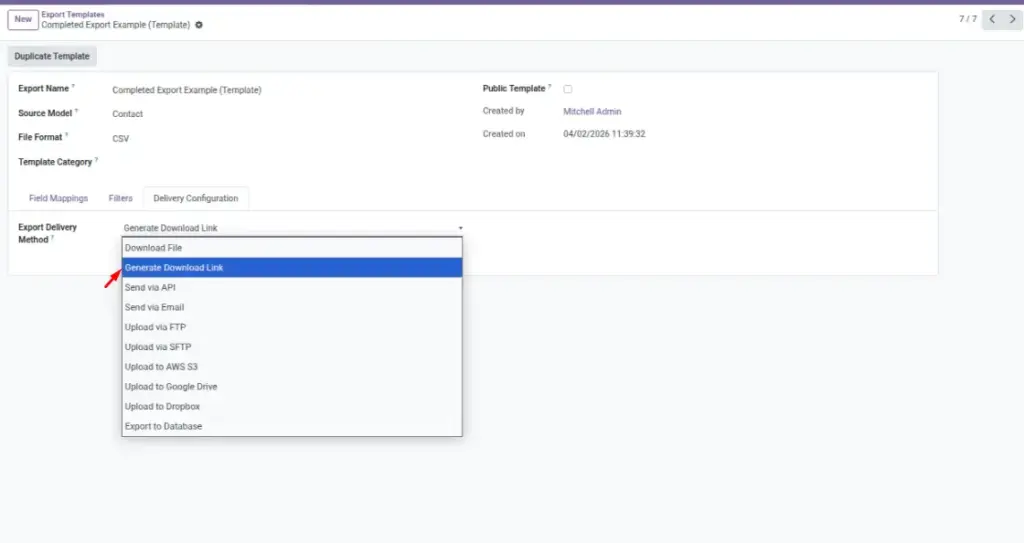
Create a link to an export so others can download it without sending the file manually.
Overview
Shareable Download Links let you share an export without sending the file as an attachment. This is useful when the export is large, when email attachment limits get in the way, or when multiple people need the same file.
Instead of forwarding files again and again, you generate the export once, copy the link, and share it with the right audience. Recipients download the file directly from the link.
Example: You share a link to “Customer Outstanding Report” with the collections team so everyone downloads the same latest file.
How It Works
- You run an export using the Download Link delivery option.
- The system generates a link (URL).
- You share the link with the right people.
Step-by-Step Guide
- Open your export configuration.
- Set Delivery Method to Generate Download Link (wording may vary).
- Run the export.
- Copy the generated Download Link.
- Share it with your teammates (email/chat).
- Use History & Logs if you need to find the link later.
Fields Table
| Field Name | Description | Example |
|---|---|---|
Delivery Method |
How the export is delivered. |
Generate Download Link |
Download Link |
The URL to download the file. |
https://your-odoo.com/…/download/… |
File Name |
Name of the export file behind the link. |
Invoices_March_2026.xlsx |
Status |
Shows whether the export completed. |
Done |
Field Explanations
Delivery Method
Choose “Download Link” when you want to share access to the file instead of sending it directly.
Download Link
Copy and share this link. Treat it like the file itself (don’t post it publicly).
File Name
Helps recipients understand what they’re downloading.
Status
Only share links from successful runs to avoid confusion.
Tips
- Use clear export names so the link is easy to trust and identify.
- Prefer links for large files to avoid email attachment limits.
- If someone can’t open the file, check File Encoding (for CSV) or export as Excel.
Common Mistakes
- Sharing a link with the wrong audience (treat links as sensitive).
- Assuming a link never expires — if it stops working, create a fresh export.
- Sharing a link before the export finishes.
Image