Automate your reporting. Run exports daily, weekly, monthly, or on a specific date — and send them automatically.
Overview
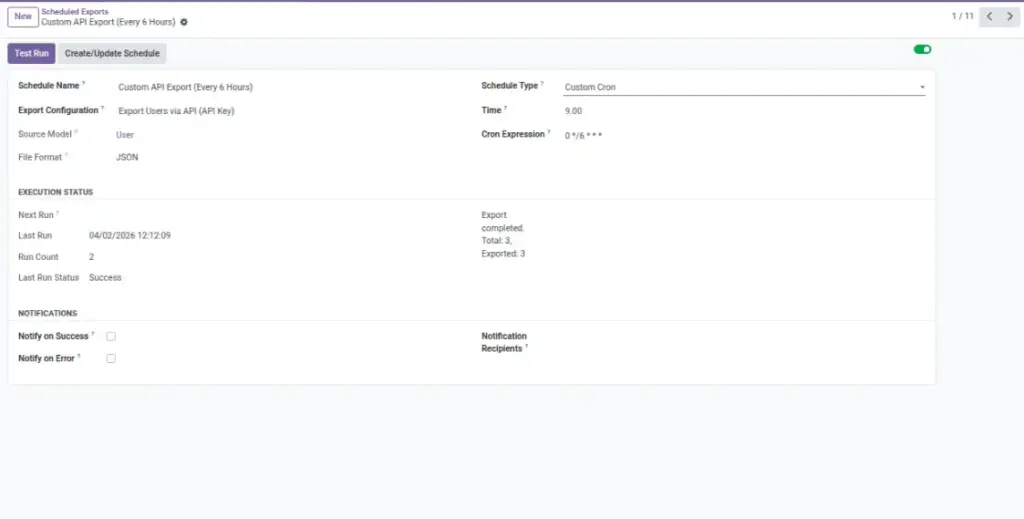
Scheduling turns your export into an automatic routine. Instead of remembering to export every day/week/month, you set a schedule once and the system runs it for you.
This is ideal for recurring reports (finance, operations, inventory) and for sending data to other teams reliably. You can also enable notifications so the right people know whether the scheduled export succeeded or failed.
Example: A “Posted Invoices” export runs every day at 9:00 AM and emails the finance mailbox.
How It Works
- Create a Scheduled Export and link it to your export configuration.
- Pick the schedule type (daily/weekly/monthly/yearly/once/custom).
- Turn on notifications and choose recipients if needed.
Step-by-Step Guide
- Go to Data Tools → Scheduled Exports → New.
- Set Schedule Name and select your Export Configuration.
- Choose Schedule Type (e.g., Weekly → Friday, 18:00).
- Optionally set email notifications and recipients.
- Click Save, then Test Run to verify delivery.
Fields Table
| Field Name | Description | Example |
|---|---|---|
Schedule Type |
How often it runs. |
Daily, Weekly, Monthly, Yearly, Run Once, Custom |
Time / Day |
Exact time or weekday/day of month. |
Friday at 18:00; Day 1 of month |
Export Configuration |
The saved setup this schedule runs. |
Invoices – Month-end (CSV) |
Notify on Success / Error |
Email result status. |
Send to Finance mailbox |
Recipients |
Who receives status emails. |
Field Explanations
Schedule Type
Match your reporting cycle (week, month, quarter).
Time / Day
Prefer off-hours to avoid peak load.
Export Configuration
Reuse a tested setup for reliable results.
Notifications
Keep stakeholders informed automatically.
Publish
Makes the form live so the public link and embed work
Tips
- Create separate schedules for different audiences (Finance vs. Sales).
- Use cloud delivery instead of email for large files.
- Run a manual test before the first scheduled run.
Common Mistakes
- Forgetting to enable the schedule (Active = On).
- Not updating the schedule after changing the configuration.
- Using business hours for heavy exports.
Image