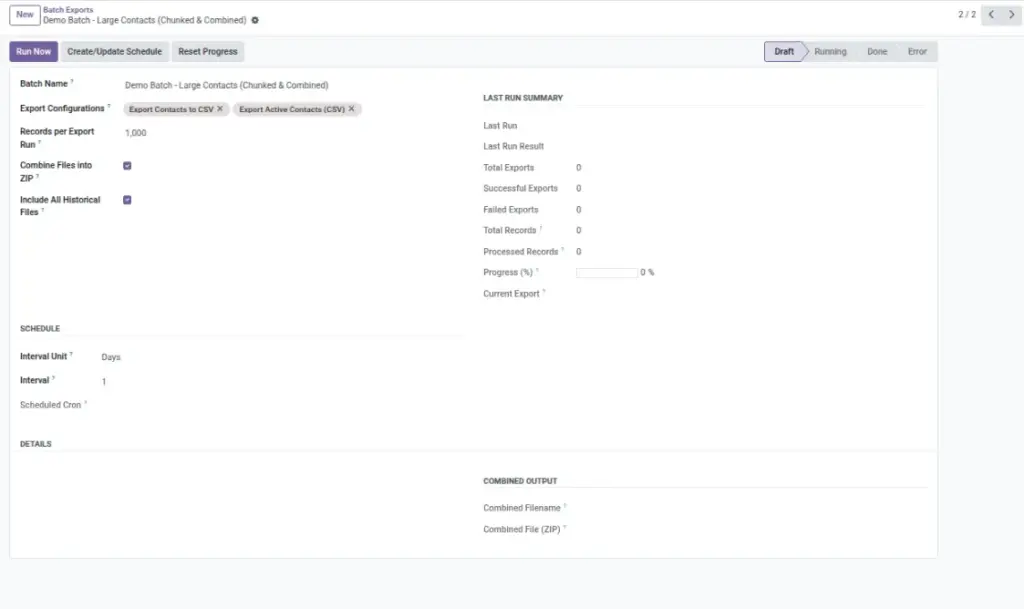
Run multiple export configurations in one go. Optionally get a single ZIP with all results.
Overview
Batch Exports help when you need multiple exports together — for example, sending a “weekly pack” that includes Sales Orders, Invoices, and Inventory. Instead of running each export one-by-one, you group them and run them as a single batch.
This is useful for busy teams because it saves time and reduces missed steps. If you enable “Combine Files into ZIP”, you’ll get one ZIP file containing all successful export files inside.
Example: Every Friday, an operations manager runs a batch that exports Sales, Stock, and Products and shares the ZIP with the team.
How It Works
- Create a new batch and add existing export configurations.
- Run the batch or schedule it with an interval.
- Optionally combine all files into one ZIP automatically.
Step-by-Step Guide
- Go to Data Tools → Batch Exports → New.
- Give the batch a name (e.g., “Weekly Ops Pack”).
- Add your export configurations (Customers, Invoices, Inventory).
- Enable Combine Files into ZIP if you want a single download.
- Click Run to execute now, or set a schedule (e.g., every Friday 17:00).
Fields Table
| Field Name | Description | Example |
|---|---|---|
Export Configurations |
List of saved exports to run in this batch. |
Customers; Invoices; Products |
Combine Files into ZIP |
Creates one ZIP with all exported files. |
weekly_ops_pack_20260401.zip |
Interval |
How often the batch runs automatically. |
Every 1 week |
Record Limit (per run) |
Optional cap per export during batch run. |
1000 |
Field Explanations
Export Configurations
Reuse your best setups across teams.
Combine Files into ZIP
Share a single file instead of many.
Interval
Automate the pack to arrive when needed.
Record Limit
Keep runs quick during peak time.
Tips
- Name batches by audience: “Finance Pack”, “Ops Pack”.
- Use consistent formats across the batch for easier processing.
- Store ZIPs in a shared cloud folder with clear subfolders.
Common Mistakes
- Too many rows per export — schedule off-hours or limit records.
- Mixing file formats that confuse recipients.
- Forgetting to reset progress when you want to re-export everything.
Image