Let users upload documents (like resumes or screenshots) and keep them attached to the submission.
Overview
File uploads are perfect when users need to provide supporting documents. Instead of asking users to email files separately, you can collect everything in one place and keep it connected to the submission in Odoo.
Common examples:
- Job applications: resume/CV, portfolio PDF
- Support requests: screenshots, error logs (as a text file)
- Registrations: ID proof, signed forms
Uploads are stored as attachments in Odoo and linked to the submission record, so your team can open them immediately when reviewing the entry.
How It Works
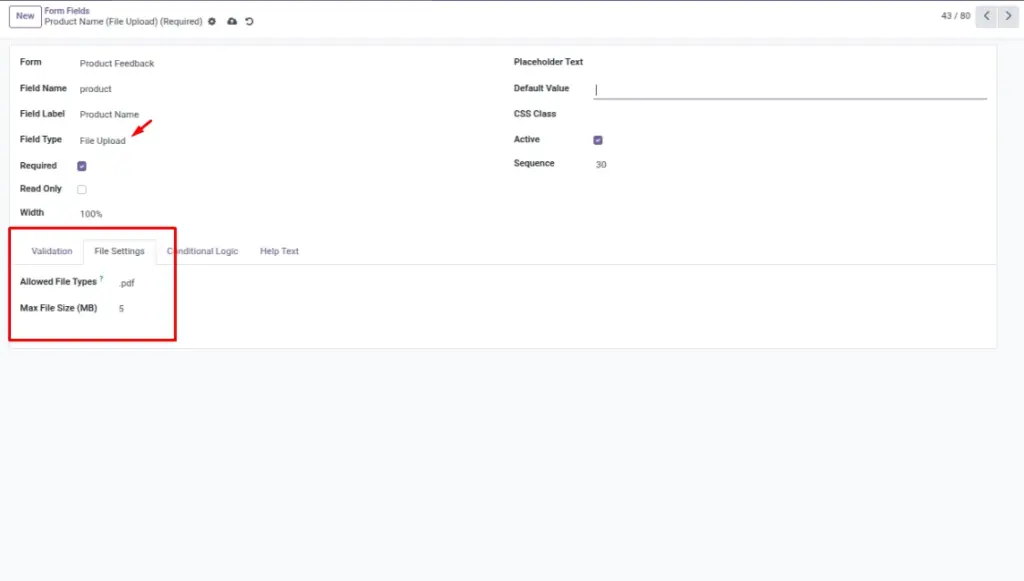
Add a field of type “File Upload”. You can limit which file types are allowed and set a maximum size. When someone submits, the file is stored as an attachment and you can open it from the submission record.
Step-by-Step Guid
- Open your form and add a new field.
- Set the field type to File Upload.
- Set Allowed File Types (example:
.pdf,.doc,.docx). - Set Max File Size (MB).
- Preview the form and submit a test file.
- Open the submission in Odoo and verify the attachment is present.
Fields Table
| Label | Description | Example |
|---|---|---|
Question type: file upload |
Must be set to file upload for attachments. |
File upload |
Allowed file types |
List of allowed extensions (comma-separated). |
.pdf, .jpg, .png |
Maximum file size (MB) |
Maximum upload size in MB. |
5 |
Uploaded files |
Attachments linked to the submission. |
Invoice.pdf |
Fields explanation
Question type: file upload
Must be set to file upload to allow attachments
Allowed file types
The file extensions users are allowed to upload
Maximum file size (MB)
Maximum upload size allowed (in MB)
Uploaded files
Where the uploaded files are stored and linked in Odoo
Tips
- Keep the size limit reasonable (5–10 MB for most cases).
- Tell users what to upload in the field label or help text.
- Use PDF for consistent viewing across devices.
Common Mistakes
- Forgetting to allow common formats (users can’t upload).
- Setting the size limit too low for real documents.
- Not testing uploads from mobile devices.