Decide whether people can open your forms via public links — and what happens when access is blocked.
Overview
This chapter is for administrators who control whether forms can be opened by the public. It explains the “global switches” that can allow or block public form pages — even when a form is published.
You typically use these controls when:
- You want to run a pilot with only one or two forms
- You need to pause all public forms during maintenance
- You want to prevent people from discovering form URLs by accident
Example: If your marketing team is preparing a campaign, you can keep forms published for testing but still hide the public interface until the launch date.
How It Works
Public access depends on both:
- Form status (the form must be published)
- Admin configuration (web access enabled, website interface not hidden, and token rules)
If the public interface is hidden, the public URL will return a “not found” style result (404), even if the form is published.
Step-by-Step Guid
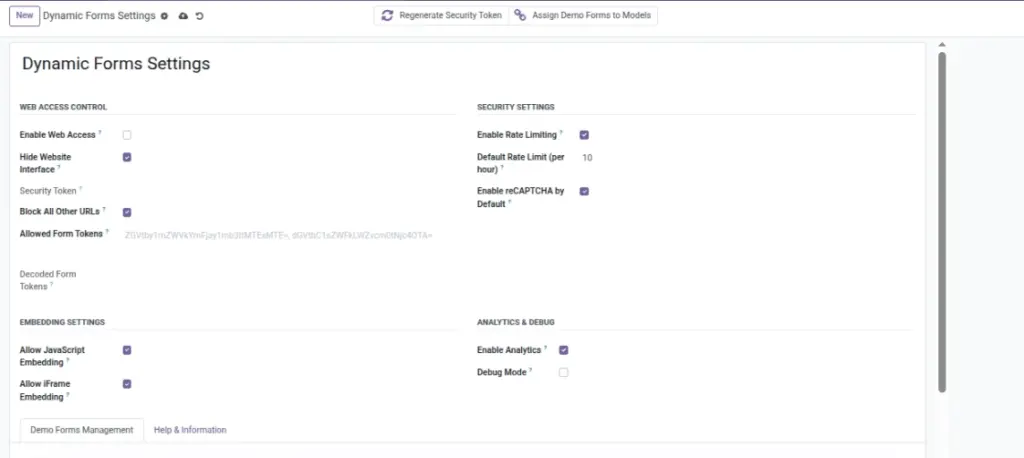
- Go to Dynamic Forms → Settings.
- Enable Web Access to allow public viewing.
- Turn off Hide Website Interface if you want the public pages to be visible.
- If you want to restrict access, add specific Allowed Form Tokens.
- Test a published form’s Public URL in a private/incognito window.
Fields Table
| Label | Description | Example |
|---|---|---|
Allow public web access |
Master switch to allow public access. |
On |
Hide public form pages |
Hides all public form pages (acts like “not found”). |
Off |
Allowed form links only |
Optional list of which published forms can be opened (comma-separated). |
Form A, Form B |
Block unknown links |
If enabled, disallowed URLs return 404. |
On |
Fields explanation
Allow public web access
Turns public access on/off for form links
Hide public form pages
Hides all public pages (even if forms are published)
Allowed form links only
Restricts access to only the listed forms
Block unknown links
If ON, disallowed URLs return “not found” (404)
Tips
- For a pilot: publish the form but restrict access using allowed tokens.
- For maintenance: temporarily hide the website interface, then re-enable later.
- Always test public URLs in incognito to avoid cached login sessions.
Common Mistakes
- Form is published but still returns 404 because “Hide Website Interface” is enabled.
- Web access is disabled in Admin Settings.
- Sharing a token-restricted link with someone who should not have access.