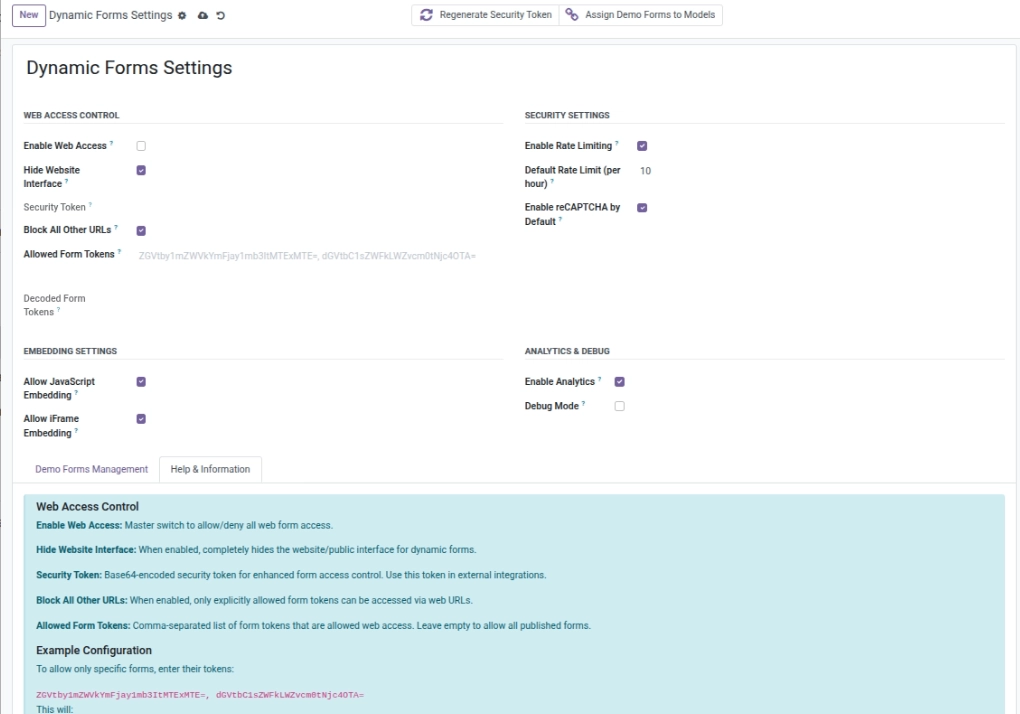
Global controls for access, embedding, analytics, and debug mode.
Overview
Admin Settings are the “global rules” for Dynamic Forms. They control what is allowed across the whole system — not just one form. This is important for security, compliance, and consistent behavior.
Use admin settings to decide:
- Whether public form pages can be accessed at all
- Whether embedding is allowed (JavaScript and/or iFrame)
- Whether rate limiting is enabled and what the default limit should be
- Whether reCAPTCHA should be enabled by default for new forms
- Whether analytics and debug logging are enabled
Example: In production, you may keep rate limiting enabled and debug mode off. During a pilot, you might restrict access to a small set of allowed tokens.
How It Works
Admins decide whether forms can be accessed publicly, which tokens are allowed (if restricted), and whether JavaScript/iFrame embedding is enabled platform-wide.
Step-by-Step Guid
- Go to Dynamic Forms → Settings.
- Enable Web Access if you want public forms.
- Keep Allowed Tokens empty to allow all published forms, or add a list to restrict.
- Choose if JavaScript and/or iFrame embedding are allowed.
- Set default rate limits and reCAPTCHA default behavior.
Fields Table
| Label | Description | Example |
|---|---|---|
Allow public web access |
Allow forms to be accessible via public URLs. |
On |
Hide public form pages |
Hide all public pages for forms (returns 404). |
Off |
Allowed form links (optional) |
Restrict access to specific published forms only (comma-separated). |
Form A, Form B |
Allow JavaScript embed |
Allow embedding via JavaScript widgets. |
On |
Allow iFrame embed |
Allow embedding via iFrames. |
On |
Rate limiting |
Apply rate limits to submissions. |
On |
Default max submissions per hour |
Default submissions per hour when not set on a form. |
10 |
Turn on spam protection for new forms |
New forms have reCAPTCHA enabled by default. |
On |
Analytics |
Track views and submissions. |
On |
Extra troubleshooting logs |
Enable extra logs for troubleshooting. |
Off |
Fields explanation
Allow public web access
Master switch for allowing public form pages
Hide public form pages
Hides all public form pages (acts like “not found”)
Allowed form links (optional)
Restrict access to only specific published forms
Allow JavaScript embed
Allows embedding via JavaScript widget
Allow iFrame embed
Allows embedding via iFrame
Rate limiting
Turns rate limiting on/off
Default max submissions per hour
Default submissions-per-hour limit
Turn on spam protection for new forms
New forms start with reCAPTCHA enabled
Analytics
Tracks views and submissions
Extra troubleshooting logs
Enables extra logs for troubleshooting
Tips
- Use allowed tokens during pilots; clear the list once live.
- Keep debug mode off in production.
Common Mistakes
- Accidentally hiding all public pages with “Hide Website Interface”.
- Setting a negative or very high default rate limit.