Send answers to the right Odoo fields with compatibility checks.
Overview
Field Mapping is how you connect form answers to real Odoo records. It tells Odoo, “When someone fills this question, save it into that field in Odoo.”
This is what turns a simple form submission into a usable business object like a Lead, Contact, Ticket, or Applicant. It also keeps data organized so your team doesn’t need to manually copy/paste answers.
Examples:
- Form field “Email Address” → Odoo Lead field “Email”
- Form field “Company Name” → Odoo Lead field “Company”
- Form field “Message” → Odoo Lead field “Description/Notes”
The module helps protect you by showing only compatible Odoo fields for each form field type (so you don’t accidentally map text into a numeric field, for example).
How It Works
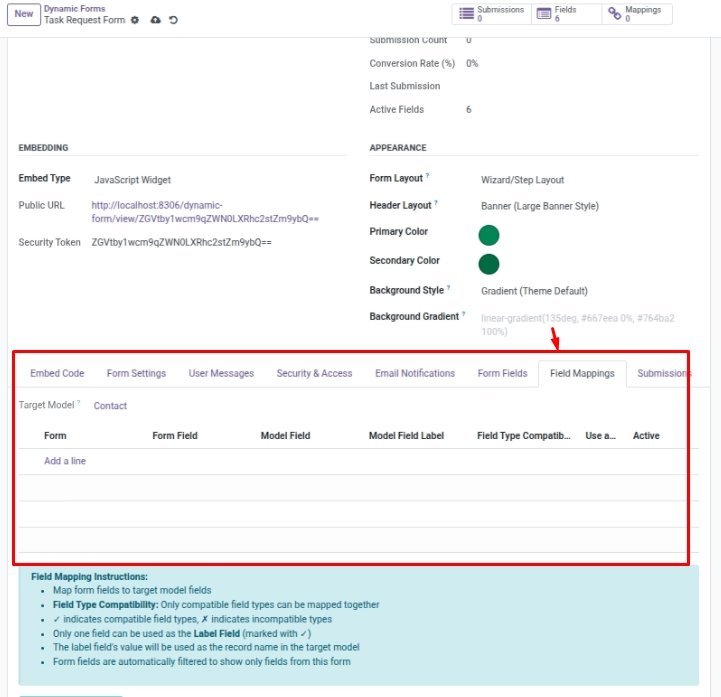
Select the “Target Model” on the form. Then, go to Mappings and pair each form field with an Odoo field. The system checks compatibility (e.g., email → char/text).
Step-by-Step Guid
- Open your form and confirm the Target Model.
- Open Field Mappings.
- Pick a Form Field and then select the Model Field.
- Optional: mark one mapping as Label Field to name created records.
- Validate mappings to review compatible and incompatible pairs.
Fields Table
| Label | Description | Example |
|---|---|---|
Form question |
Which question from your form is being mapped. |
“Email Address” |
Odoo field |
The field in Odoo where this answer is saved. |
Email (from lead) |
Use as record title |
Use this answer as the created record’s name. |
On |
Mapping active |
Only active mappings are used during processing. |
On |
Type match check |
Shows if the types match (e.g., text → short text). |
✓ Text → short text |
Fields explanation
Form question
The form question you are mapping
Odoo field
The Odoo field where the answer will be saved
Use as record title
Use this answer as the created record’s title/name
Mapping active
Only active mappings are used during processing
Type match check
Shows whether the chosen pair is compatible
Tips
- Map only what you need. Unmapped fields still show in submission details.
- Use “Label Field” to make records easy to recognize in Odoo.
- Relational fields (many2one, etc.) need special handling — keep mappings to basic types.
Common Mistakes
- Choosing an incompatible field (the system will warn you).
- Forgetting to set the Target Model before mapping.