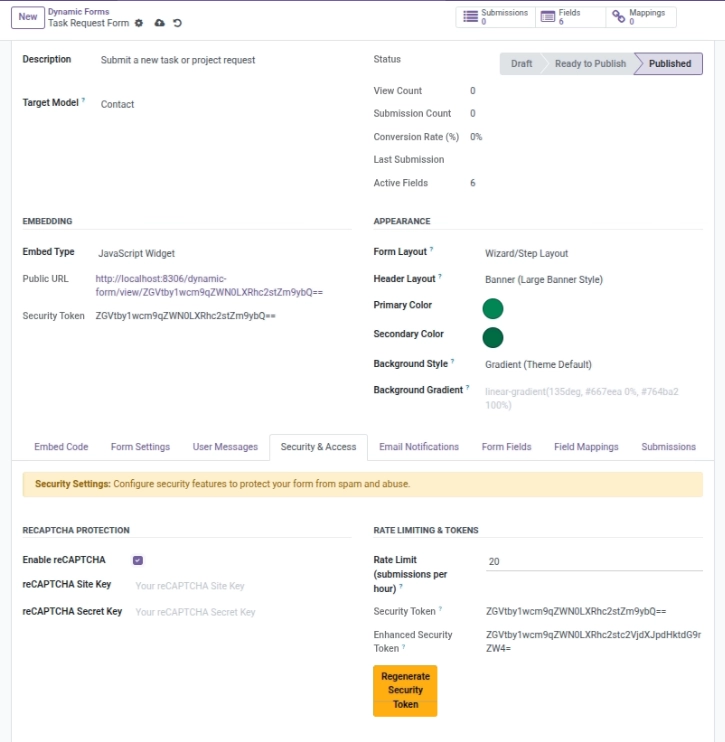
Control access, block spam, and keep your data safe.
Overview
This chapter helps you protect your forms from spam and unwanted submissions. Public forms are powerful, but without basic protections you may receive fake entries that waste your team’s time.
With this module you can:
- Enable reCAPTCHA to block bots
- Set a rate limit to reduce repeated spam attempts
- Use tokens in public links so each form has a unique, hard-to-guess URL
- Control access globally through admin settings (web access on/off, hide public interface)
Example: If your “Contact Us” form starts receiving spam, enable reCAPTCHA and reduce the hourly rate limit to keep it under control.
How It Works
Enable reCAPTCHA per form. Set submission rate limits. Use public URL tokens for embedding. Admins can allow or block certain tokens or hide the website interface entirely.
Step-by-Step Guid
- In your form, enable reCAPTCHA and add site/secret keys.
- Set a Rate Limit to reduce spam bursts.
- In Admin Settings, review web access rules and allowed tokens.
Fields Table
| Label | Description | Example |
|---|---|---|
Spam protection (reCAPTCHA) |
Turns on Google reCAPTCHA for the form. |
On |
reCAPTCHA site key |
Your reCAPTCHA site key. |
6Le…abc |
reCAPTCHA secret key |
Your reCAPTCHA secret key. |
6Le…xyz |
Max submissions per hour |
Max submissions per hour per source. |
10 |
Public form link |
The shareable URL people use to open the form. |
https://yoursite/…/your-form |
Fields explanation
Spam protection (reCAPTCHA)
Turns reCAPTCHA on/off for this form
reCAPTCHA site key
The public key needed to display reCAPTCHA
reCAPTCHA secret key
The private key used to verify reCAPTCHA
Max submissions per hour
Limits how many submissions are allowed per hour
Public form link
The link people use to open the public form
Tips
- Leave “allowed tokens” empty to allow all published forms.
- Enable analytics to spot spam bursts quickly.
Common Mistakes
- Forgetting to add reCAPTCHA keys after enabling it.
- Blocking all forms by turning on “Hide Website Interface”.