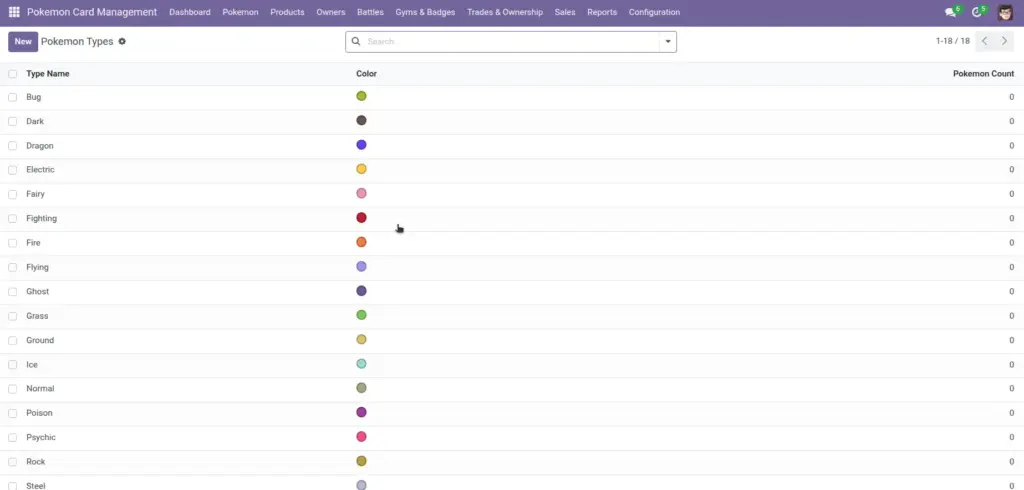
Types keep your collection organized. They also power tags, colors, and type‑chart relationships like strengths and weaknesses.
1) Overview
Go to Configuration → Pokemon Types to manage types (Fire, Water, Electric, etc.). Each type can have a color and a simple type chart (strengths and weaknesses).
- Type Name
- Color
- Strengths / Weaknesses
- Pokemon Count
2) How it works
Colors and tags
Type colors are used in tags so lists and kanban cards become easier to read at a glance.
Why it matters: People make fewer mistakes when they can spot a type visually.
Strengths and weaknesses
Strengths and weaknesses are optional lists. They don’t “auto‑calculate battles”, but they help your team keep decisions consistent.
Tip: keep the chart simple and consistent
3) Step-by-step guide
- Open Configuration → Pokemon Types and click Create.
- Enter the Type Name (for example, “Fire”).
- Pick a Color (helps tags stand out).
- Open the Type Chart tab and add Strengths and Weaknesses (optional).
- Save. Then go back to Pokemon and start using the type in Pokemon records.
Best practice: Decide a standard set of types for your organization and avoid duplicates (like “Electric” and “Electrics”).
4) Fields table
| Field Name | Description | Example |
|---|---|---|
Type Name |
The display name of the type. Must be unique. |
Water |
Color |
Color used for tags and visual scanning. |
#3B82F6 |
Strengths |
Types this type is strong against. |
Fire, Rock |
Weaknesses |
Types this type is weak against. |
Electric, Grass |
Pokemon Count |
Automatic count of Pokemon with this type. |
12 |
Description |
Optional notes about the type. |
“Common in coastal routes.” |
5) Field name explanation
Type Name
The name you’ll pick when creating Pokemon and Moves. Keep it short and consistent.
Example: Use “Electric”, not “Elec” in one place and “Electric” elsewhere.
Color
A visual helper. It doesn’t change logic; it improves readability and reduces mistakes.
Example: Make Water blue, Fire red, Grass green.
Strengths / Weaknesses
A simple “type chart” reference. Use it for training, consistency, and quick decisions.
Example: Electric has Strengths vs Water and Weaknesses vs Ground.
Pokemon Count
Automatically tells you how widely a type is used in your collection.
Example: If Pokemon Count is 0, the type might be unused or newly created.
Description
Optional notes about the type for your team (training, conventions, or internal meaning).
Example: “Common in coastal routes.”
6) Tips
- Create types before Pokemon so your team can select them quickly.
- Use a single naming standard (title case, one word) to keep search results clean.
- Use the Pokemon tab on a type record to see which Pokemon belong to it.
7) Common mistakes
- Duplicate names: the system blocks duplicates, but similar names can still confuse users (e.g., “Fire” vs “Fire Type”).
- Overcomplicating the type chart: keep Strengths/Weaknesses practical for your use case.
- Forgetting color: tags become harder to scan when everything looks the same.
8) Image