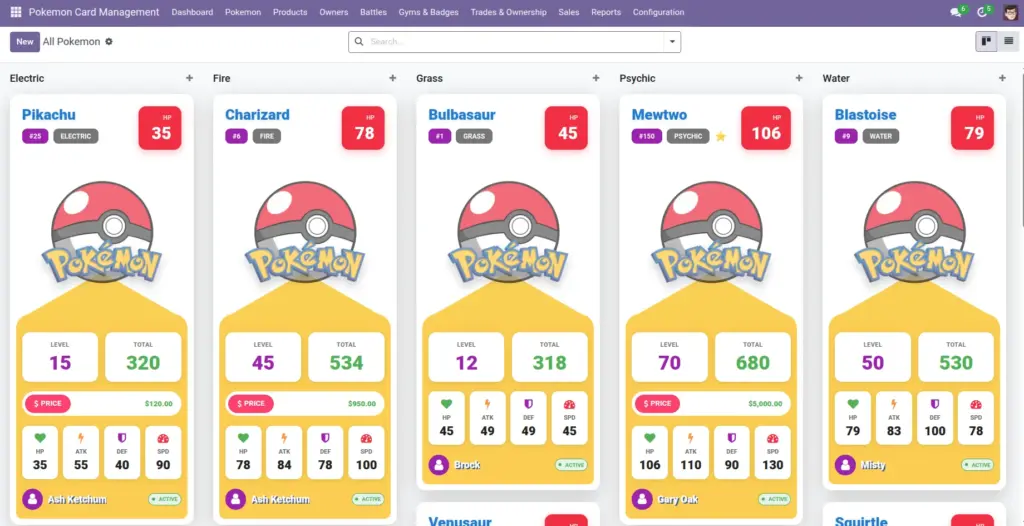
Create and maintain Pokemon records with types, stats, owner, status, pricing, and learned moves. The system automatically keeps a Price History each time you change the price.
1) Overview
Use Pokemon → All Pokemon for your full list. Use Pokemon → My Pokemon to see only Pokemon linked to your user (through your Owner record). Use Pokemon → Pokemon for Sale to view Pokemon with a price greater than 0.
- All Pokemon
- My Pokemon
- Captured Today
- Pokemon for Sale
- Price History
2) How it works
What happens when you change price
When you edit the Price, the module creates a new line in Price History (old price, new price, date, who changed it). This helps you explain pricing decisions later.
Why it matters: You can confidently answer “When did the price change?” without searching old messages or spreadsheets.
Status and HP
Status is a quick label like Active, In Deck, Fainted, In Gym, or Released. If you set HP to 0 (or below), the Pokemon can automatically become Fainted.
Tip: use Status for filters and reporting
3) Step-by-step guide
- Go to Pokemon → All Pokemon and click Create.
- Fill Name and Pokedex Number first. (Pokedex Number must be unique.)
- Choose Primary Type (and optionally Secondary Type).
- Set Owner (trainer). This helps with “My Pokemon”, trades, and sales flows.
- Enter Level (1–100), Experience, and Status.
- Open the Stats tab and fill HP, Attack, Defense, Special Attack, Special Defense, Speed. Total updates automatically.
- If you plan to sell, set a Price. Then it will appear in Pokemon for Sale.
- Open Abilities & Moves to add abilities and learned moves.
- Upload an Image to make kanban cards easy to scan.
Time saver: Create a few Types, Moves, and Abilities in Configuration first—then adding Pokemon becomes mostly selection, not typing.
4) Fields table
| Field Name | Description | Example |
|---|---|---|
Pokemon Name |
The name you want to display in lists and cards. |
Pikachu |
Pokedex Number |
Unique identifier used in the display name. |
25 |
Owner (Trainer) |
Who currently owns this Pokemon. |
Ash Ketchum |
Primary Type |
Main type used for grouping and tags. |
Electric |
Secondary Type |
Optional extra type. |
Flying |
Level |
From 1 to 100. Used for progress and evolution checks. |
12 |
Experience |
Used for level ups when experience reaches a threshold. |
1200 |
Status |
Quick label for where the Pokemon is (Active, In Deck, Fainted, In Gym, Released). |
Active |
Evolution Stage |
Basic, Stage 1, or Stage 2. |
Basic |
Price |
Current selling price. Changing it creates a Price History entry. |
$25.00 |
Capture Date |
When you captured/received the Pokemon. |
2026‑04‑06 |
Capture Location |
Where you captured/received it (from Locations). |
Viridian Forest |
Abilities |
Abilities assigned to the Pokemon. |
Static |
Learned Moves |
Moves the Pokemon knows, including the level learned and PP values. |
Thunder Shock (Level 5) |
Base Stats |
HP, Attack, Defense, Special Attack, Special Defense, Speed. Cannot be negative. |
HP 35, ATK 55… |
Total Stats |
Automatic sum of all base stats. |
320 |
Legendary / Mythical |
Labels for special Pokemon (useful for filters). |
Legendary ✓ |
Archive |
Hide the Pokemon without deleting it. |
Archive old duplicates |
5) Field name explanation
Pokemon Name
The display name you and your team will search for and recognize in lists and kanban cards.
Example: “Pikachu”.
Pokedex Number
This must be unique. It appears in the Pokemon’s display name like “Pikachu (#25)”.
Example: If you try to reuse 25, the system will stop you to avoid duplicates.
Owner (Trainer)
Who owns the Pokemon. This affects “My Pokemon”, trades, battles, and sales ownership transfers.
Example: Set Owner = “Ash” so it appears under Ash’s profile.
Primary / Secondary Type
Types help you filter, group, and visually scan your collection. Primary is required; secondary is optional.
Example: Group by Primary Type to see how many Water vs Fire Pokemon you have.
Level
A number from 1 to 100. Used for progression and for level-based evolution checks.
Example: Level 12.
Experience
Experience points used to level up over time (often awarded from battles).
Example: Add 200 XP after a battle win.
Price + Price History
Price is what you sell for today. Price History keeps the “story” of changes (who/when/what).
Example: Increase price after an event; add a note in Price History explaining why.
Capture Date
The date you captured or received this Pokemon. Useful for “Captured Today” and reporting.
Example: 2026‑04‑06.
Capture Location
Where the Pokemon was captured/received. Select from the Locations list for consistency.
Example: “Viridian Forest”.
Abilities
Abilities attached to the Pokemon as reusable tags from the Abilities library.
Example: “Static”.
Learned Moves
Each learned move includes “Level Learned” and PP details so you can track move readiness.
Example: “Quick Attack — Level Learned 7”. PP Remaining starts at the move’s PP Max.
Status
A fast way to communicate what’s going on with the Pokemon (Active, In Deck, Fainted, In Gym, Released).
Example: Mark “In Gym” when assigned to a gym team.
Evolution Stage
A simple label (Basic, Stage 1, Stage 2) to describe where the Pokemon is in its evolution line.
Example: “Stage 1”.
Base Stats
HP and other core stats. They cannot be negative; Total Stats is calculated from them.
Example: HP 35, Attack 55, Defense 40.
Total Stats
Automatic sum of HP, Attack, Defense, Special Attack, Special Defense, and Speed.
Example: Total 320.
Legendary / Mythical
Optional labels used for filtering and quick visual scanning.
Example: Mark Legendary for rare showcase Pokemon.
Archive
Hide old records without deleting them, so history and reports still make sense.
Example: Archive duplicates or retired Pokemon.
6) Tips
- Use kanban for scanning: the kanban cards show key stats and badges like Legendary/Mythical.
- Keep stats realistic: negative numbers are blocked; if you see an error, check for a minus sign.
- Use “Captured Today” after events to quickly review what was added.
- Add notes to price changes in the Price History tab so future you understands the reason.
7) Common mistakes
- Level outside 1–100: the system will block saving. Fix the Level field first.
- Duplicate Pokedex Number: can’t be saved. Search before creating a new Pokemon.
- Setting Price but forgetting Owner: it can later cause confusion when selling or trading.
- Mixing up Primary vs Secondary Type: primary is used more often for grouping and reporting.
8) Image