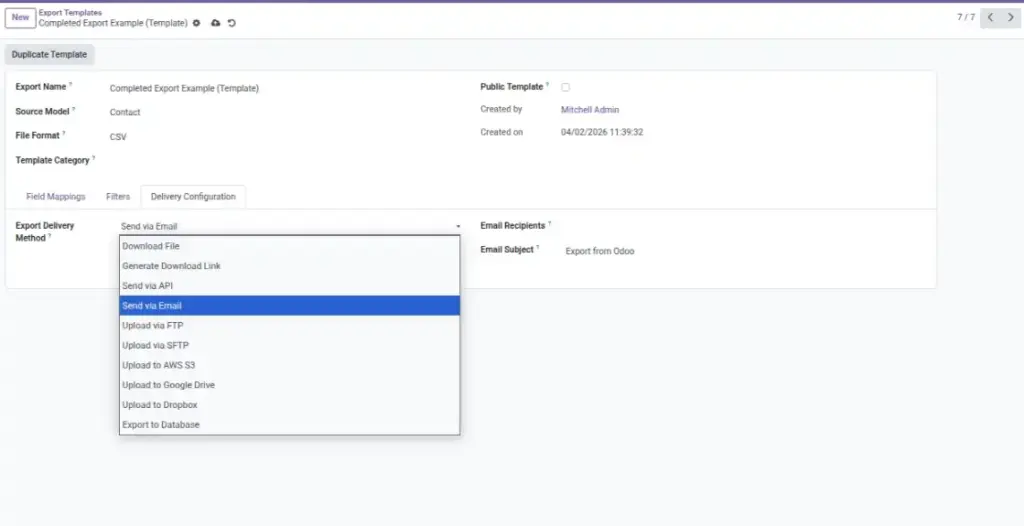
Send exported files where your team needs them: download, email, FTP/SFTP, cloud storage, or via API.
Overview
Delivery & Destinations decides where your exported file goes after it is generated. This is important because different teams work differently: some want a quick download, others need files delivered to email, shared folders, or cloud storage.
If you export the same report often, delivery settings save time and reduce mistakes. Instead of downloading and manually uploading every time, you can let Odoo send the export to the right place automatically.
Example: A weekly “Stock On Hand” export is delivered to a shared Google Drive folder so the warehouse team always sees the latest file.
How It Works
- Pick a Delivery Method.
- Enter the connection or recipient details.
- Test the delivery and save the configuration.
Step-by-Step Guide
- In your export configuration, set Delivery Method to one of:
- Download File / Download Link
- FTP or SFTP
- Cloud: AWS S3, Google Drive, Dropbox
- API (send to external endpoint)
- Fill in destination details (e.g., email addresses, server/keys, folder path).
- Click Test if available, or run a small export.
- Save the configuration. Combine with Scheduling to automate.
Fields Table
| Field Name | Description | Example |
|---|---|---|
Delivery Method |
Where to send the file. |
Download, Email, FTP/SFTP, S3, Google Drive, Dropbox, API |
Recipients / Endpoint |
Email addresses or API endpoint URL. |
[email protected]; https://api.partner.com/upload |
Credentials |
Login, key, or token to access the destination. |
Access key for S3; SFTP user/password |
Folder / Bucket |
Remote path or bucket where the file is stored. |
s3://company-reports/invoices/ |
Field Explanations
Form Name
The form title your team uses to identify it in Odoo
Target Model
The Odoo area where you want to store/create data (example: Leads)
Embed Type
How you will place the form on a website (JavaScript or iFrame)
Theme & Layout
The visual style and structure of the form
Publish
Makes the form live so the public link and embed work
Tips
- Use a dedicated cloud folder for each report type.
- Combine with scheduling to deliver files automatically on Mondays.
- Keep credentials in a secure password manager.
Common Mistakes
- Wrong folder path — file is uploaded but hard to find.
- Expired credentials — schedule runs but delivery fails.
- Attachment too large for email — prefer cloud or FTP.
Image