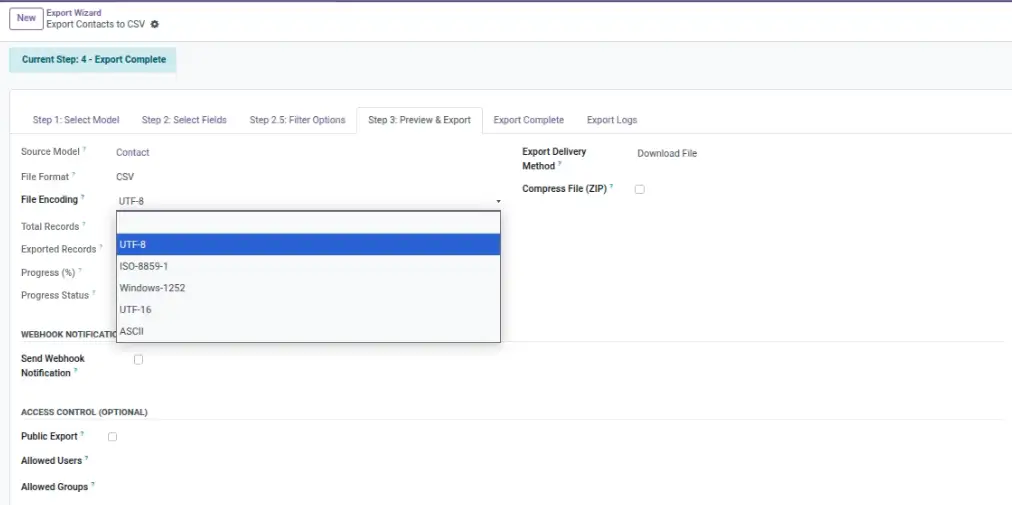
If you see weird symbols like “é” instead of “é”, choose the right encoding before exporting.
Overview
File encoding controls how letters and symbols are stored in text files like CSV, TSV, XML, and JSON. When encoding is wrong, names and symbols can look broken (for example: “München” instead of “München”).
Different tools expect different encodings. UTF‑8 is the most common and is recommended for modern systems, but some older tools (or some Excel setups) may work better with Windows‑1252 or ISO‑8859‑1.
Example: You export a customer list and notice ₹ / é / ü characters look wrong in Excel — switching encoding fixes it.
How It Works
- You choose an encoding (UTF‑8 is the most common).
- Advanced Export Pro generates the file using that encoding.
- Your spreadsheet or external system reads it correctly.
Step-by-Step Guide
- Open your export configuration.
- Choose a text-based format (CSV/TSV/XML/JSON).
- Find File Encoding.
- Start with UTF‑8 (recommended).
- If Excel shows strange characters, try Windows‑1252 or ISO‑8859‑1.
- Export again and re-check the file.
Fields Table
| Field Name | Description | Example |
|---|---|---|
File Encoding |
How text characters are stored in the exported file. |
UTF‑8 |
Format |
Encoding matters most for text formats. |
CSV |
Special Characters |
Letters outside A‑Z that may break if encoding is wrong. |
José, München, ₹ |
Field Explanations
File Encoding
The key setting that decides whether names and symbols look correct.
Format
For Excel (XLSX), encoding is usually not a problem. For CSV/TSV, it often is.
Special Characters
If you export languages with accents or currency symbols, test the encoding.
Tips
- If your audience uses Excel, consider exporting as Excel (XLSX) instead of CSV.
- Standardize one encoding across your team so files import consistently.
- Test with a record that contains accented characters before scheduling.
Common Mistakes
- Changing encoding after scheduling and forgetting to re-test the output.
- Assuming all systems support UTF‑8 (most do, but not all legacy tools).
Image