Choose which WordPress page shows your diamonds, how many appear per page, how the grid looks, and which diamond details your customers can see.
Overview
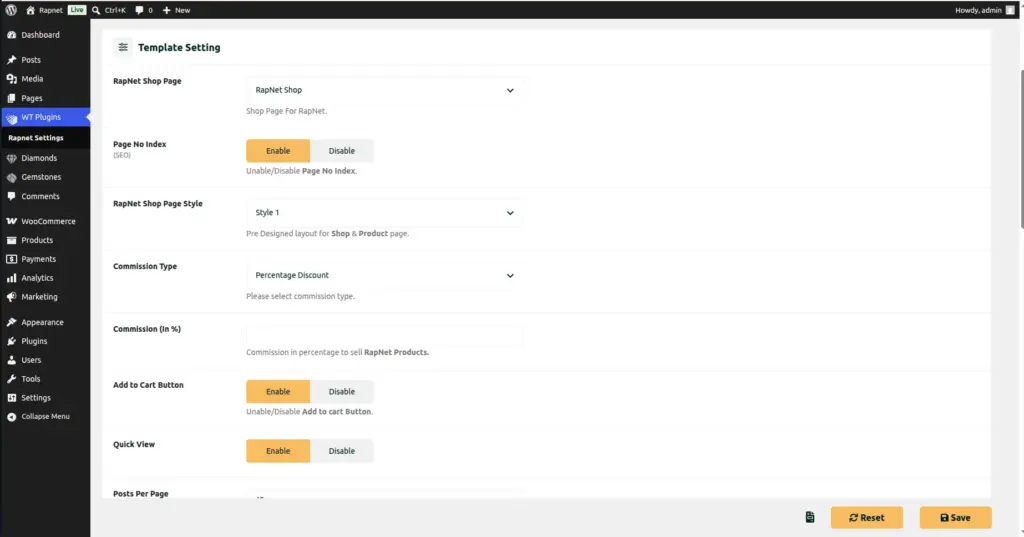
This chapter covers the Template Setting section of the Rapnet Settings screen – the group of options that controls how your shop page looks and behaves for shoppers, from the number of columns in the grid to which data columns appear in the results table.
How It Works
All of these settings live in one place – WT Plugins → Rapnet Settings → Main Setting – under the Template Setting heading. Changes here apply instantly to your live RapNet Shop page; there is nothing to publish or rebuild. One setting, Active Columns, is a drag-and-drop list: whatever order you arrange the fields in is the exact order customers will see them in the results table.
Step-by-Step Guide
1. Open Template Setting
Go to WT Plugins → Rapnet Settings → Main Setting and scroll down to the Template Setting section.
2. Choose your shop page
In RapNet Shop Page, confirm or change which WordPress page displays your diamond shop. The plugin created one for you automatically during installation, but you can point it at a different page if you prefer.
3. Decide on search engine visibility
Turn on No Index Page only if you do not want this page to appear in Google search results (for example, while you are still setting things up).
4. Set the grid layout
Choose how many Columns of diamonds appear side by side (1 to 4), and how many Products Per Page load at once.
5. Choose how more results load
Pick a Load More Type: classic page numbers (Pagination), an automatic “Scroll to Load”, or a manual “Load More” button.
6. Turn shopping features on or off
Use the Add to Cart switch to show or hide the Add to Cart button, and the Quick View switch to allow shoppers to preview a diamond in a popup without leaving the results page.
7. Arrange your visible columns
In Active Columns, drag the diamond details (Shape, Size, Color, Clarity, Cut, Price, Certificate #, and more) into the order you want them shown, and remove any you don’t want visible.
8. Upload a custom loading icon (optional)
If you want a branded spinner while results load, upload one in the Loader field.
9. Save your changes
Scroll down and click Save Changes, then refresh your shop page to see the result.
Fields Table
| Field Name | Description | Example |
|---|---|---|
RapNet Shop Page |
The WordPress page used to display your diamond shop to visitors. |
RapNet Shop |
No Index Page |
Adds a “noindex, nofollow” tag so search engines skip this page. |
Off (recommended once live) |
Style |
The overall visual layout style used for the shop and single product pages. |
Style 1 |
Columns |
Number of diamonds shown side by side per row in the results grid. |
3 |
Products Per Page |
How many diamonds load at once before pagination/loading more. |
24 |
Load More Type |
How additional results are revealed: Pagination, Scroll to Load, or a Load More button. |
Load More Button |
Add to Cart |
Shows or hides the Add to Cart button on diamond listings. |
On |
Quick View |
Lets shoppers preview full diamond details in a popup without leaving the results page. |
On |
Loader |
A custom image shown briefly while search results are loading. |
spinner.gif |
Active Columns |
Drag-and-drop list controlling which diamond details show in the results table, and in what order. |
Shape, Size, Color, Clarity, Price |
Field Explanations
- RapNet Shop Page and No Index Page control where and how publicly your shop appears – keep “No Index” off once you’re ready for customers and search engines to find the page.
- Columns and Products Per Page control density: more columns and more products per page suit stores with large catalogs and desktop-heavy traffic, while fewer of each keep things simpler on smaller screens.
- Load More Type is purely about browsing comfort – Pagination suits shoppers who like page numbers, Scroll to Load suits a social-media-style browsing feel, and a Load More button gives shoppers manual control.
- Add to Cart and Quick View are independent on/off switches – you can, for example, disable Add to Cart if you want your shop to work as a catalog only, with inquiries handled offline.
- Active Columns is the most powerful setting here: it decides exactly which diamond facts (Shape, Carat, Color, Clarity, Cut, Polish, Symmetry, Measurements, Lab, Price, Certificate Number, and more) your shoppers can see and compare at a glance, and in what order.
Tips
- Start with 3 columns and a Load More button – it’s a safe, mobile-friendly default most stores use.
- Keep Active Columns focused on 5–7 of the most important facts (Shape, Size, Color, Clarity, Price) so the table doesn’t feel overwhelming.
- Turn on Quick View so shoppers can compare stones quickly without losing their place in the results.
- Leave No Index Page off once your shop is ready – otherwise customers won’t find it through Google.
Common Mistakes
- Forgetting to click Save Changes after reordering Active Columns – the drag-and-drop order is not saved automatically.
- Turning on No Index Page and forgetting to turn it back off before launch, which hides the shop from search engines.
- Adding too many Active Columns, making the results table difficult to read on smaller screens.
- Setting Products Per Page very high (like 48) with Pagination off, which can slow down the page for shoppers on slower connections.
Image