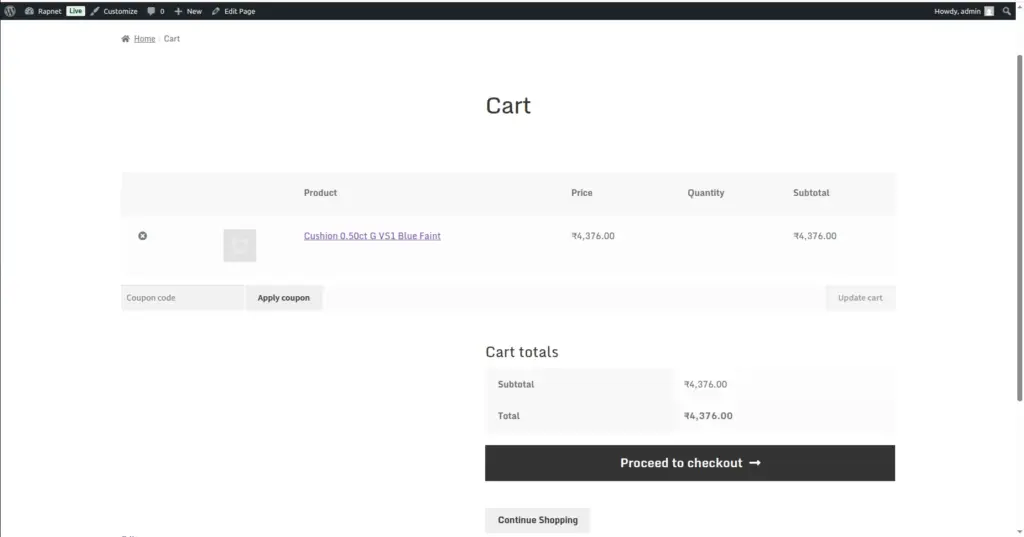
Understand what happens behind the scenes when a customer adds a diamond to their cart and completes checkout, since diamonds work a little differently from normal WooCommerce products.
Overview
Every diamond is a unique, one-of-a-kind item – unlike a T-shirt or a candle, you can’t have “5 in stock” of the exact same stone. This chapter explains how RapNet For WooCommerce adapts WooCommerce’s cart and checkout to handle that correctly, so orders and your inventory always stay accurate.
How It Works
Behind the scenes, every diamond order actually uses one single, hidden WooCommerce product (created automatically during installation – see Getting Started) as a stand-in. When a customer adds a specific diamond to their cart, the plugin quietly attaches that diamond’s full details to the cart item, and then rewrites the cart, checkout, and order screens to display the real diamond’s name, photo, and price instead of the hidden stand-in product. Because each diamond is unique, the quantity is always locked to exactly 1, and once a specific diamond has appeared on a completed order, it cannot be added to a cart again by another shopper.
Step-by-Step Guide
1. Shopper finds a diamond they want
Using search/filter (How Customers Search & Browse) or Quick View (Designing Your Shop Page).
2. Shopper clicks Add to Cart
The specific diamond’s full details are attached to their cart automatically; quantity is fixed at 1 and cannot be changed.
3. Price is calculated with your markup
The price shown in the cart already includes your Commission/markup setting from Selling Price & Markup – shoppers never see the raw base price.
4. Shopper proceeds to checkout
The checkout page shows the real diamond’s name and photo, just like a normal WooCommerce product, even though it’s technically one shared placeholder behind the scenes.
5. Shopper completes payment
Checkout completes using your store’s normal WooCommerce payment gateways – no special payment setup is needed for diamonds.
6. Order is recorded with full diamond details
The completed order stores the diamond’s complete information and a reference ID, so you (and the customer) always know exactly which stone was purchased.
7. The diamond becomes unavailable to others
Once an order for that diamond is complete, no other shopper can add the same stone to their cart again.
Fields Table
| Field Name | Description | Example |
|---|---|---|
RapNet Product |
The single hidden WooCommerce placeholder product used to process every diamond order. |
Created automatically on activation |
Quantity |
Always fixed to 1 for diamond purchases, since every stone is unique. |
1 |
Order Diamond Reference |
The specific diamond’s details and ID, saved permanently on the completed order. |
Diamond ID: NAT-DEMO-001 |
Field Explanations
The RapNet Product is not something you manage directly – it’s an internal mechanism the plugin relies on to reuse WooCommerce’s existing cart and checkout system, rather than needing to build a separate one from scratch. You should never need to edit or delete it.
Quantity is locked to 1 because two customers can never buy “the same” diamond – it’s a single physical stone. This is enforced automatically and cannot be changed in settings.
The Order Diamond Reference is what lets you look back at any past order and know precisely which stone (by its ID and full specifications) was sold, even though the order technically used the shared RapNet Product behind the scenes.
Tips
- Never edit or delete the auto-created “RapNet Product” placeholder – it is required for diamond checkout to work.
- Check an order’s line-item details if you ever need to confirm exactly which diamond was purchased.
- Remember a diamond automatically becomes unavailable for purchase again once it’s part of a completed order – no manual step needed.
Common Mistakes
- Deleting or editing the hidden RapNet placeholder product from WooCommerce’s product list – this will break checkout for diamonds.
- Expecting to sell multiple quantities of the same diamond – quantity is always locked to 1 by design.
- Manually re-adding a diamond that’s already sold to your inventory list, which could let a second customer attempt to buy a stone that’s no longer available.
Image