Decide how much profit margin to add on top of each diamond’s base price before it reaches your customers.
Overview
Diamonds – whether pulled live from RapNet or from your own local inventory – arrive with a base wholesale-style price. This chapter explains how to add your own markup so customers pay your selling price, not the raw wholesale price.
How It Works
Every diamond has a base price. When a shopper adds it to their cart, the plugin recalculates the price shown at checkout by applying your chosen markup rule on top of that base price. This happens automatically, every time, for every diamond – you set the rule once, and it applies across your entire shop.
Step-by-Step Guide
1. Open Main Setting
Open Main Setting Go to WT Plugins → Rapnet Settings → Main Setting.
2. Find the pricing fields
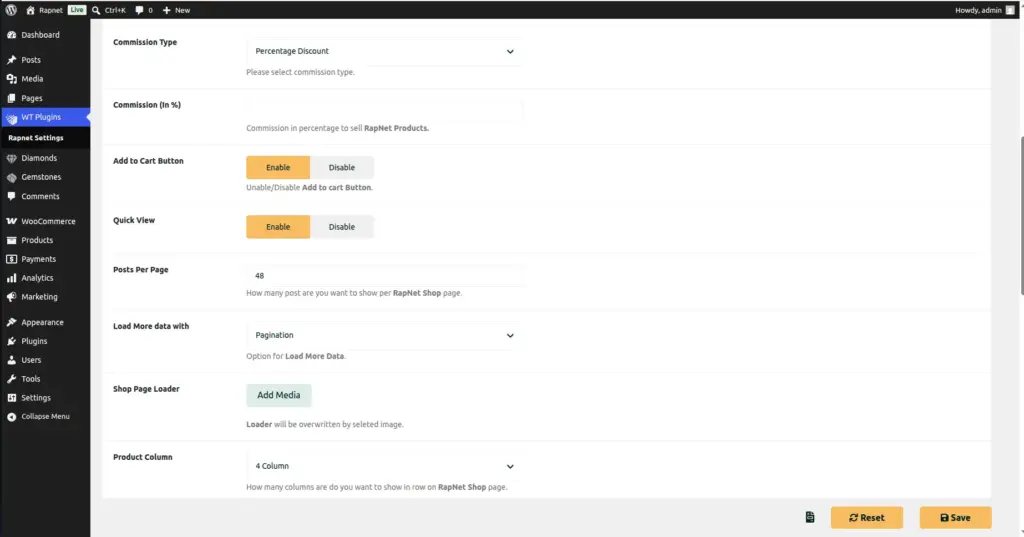
Look for Commission Type and Commission in the Template Setting section.
3. Choose your markup type
Set Commission Type to Percentage Discount if you want to add a percentage on top of each diamond’s price, or Fixed Discount if you want to add the same flat amount to every diamond regardless of its price.
4. Enter your markup amount
In Commission, enter the percentage (0–100) or flat amount you want added.
5. Save your changes
Click Save Changes. The new markup applies immediately to every diamond in your shop, on both the shop page and at checkout.
6. Double-check with a test diamond
Open any diamond on your shop’s front end and confirm the displayed price matches the base price plus your markup.
Fields Table
| Field Name | Description | Example |
|---|---|---|
Commission Type |
Whether your markup is a percentage of the diamond’s price, or a fixed amount added to every diamond. |
Percentage Discount |
Commission |
The percentage or flat amount added on top of the diamond’s base price. |
12 (meaning 12%, or $12 if Fixed) |
Field Explanations
Commission Type = Percentage Discount means your markup scales with the diamond’s price – a $10,000 diamond and a $500 diamond both get the same percentage added, so your margin grows proportionally with the size of the stone.
Commission Type = Fixed Discount means every diamond gets exactly the same flat amount added, regardless of its price – simple and predictable, but it represents a much smaller percentage margin on expensive stones than on cheap ones.
The Commission value is interpreted according to whichever type you picked above: a plain number that means “percent” under Percentage Discount, or a currency amount under Fixed Discount.
Tips
- Percentage Discount is usually the better choice for stores selling diamonds across a wide range of prices.
- Recalculate your margin after any change – a small percentage tweak can have a big effect on high-value stones.
- Test with both a low-price and a high-price diamond after saving, to confirm the markup behaves as expected at both ends.
- Remember this single setting applies to every diamond and gemstone in your shop – there is no per-product override.
Common Mistakes
- Entering a percentage value while Fixed Discount is selected (or vice-versa), resulting in prices that are far too high or far too low.
- Forgetting this setting affects your entire catalog – there is no way to set a different markup for individual diamonds or categories.
- Not re-checking prices after changing the markup, which can lead to underpricing expensive stones or overpricing cheap ones.
Image