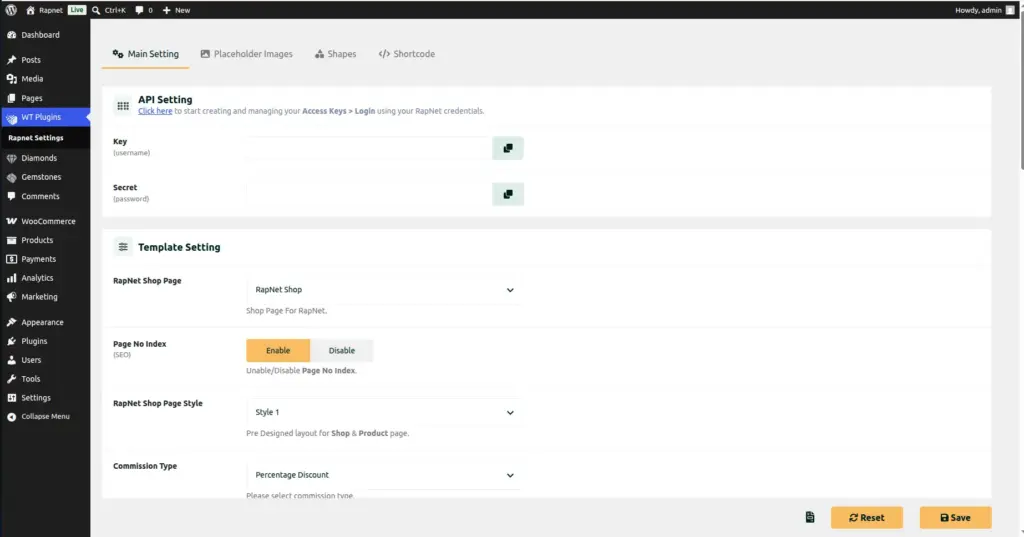
Connect your store to RapNet’s live diamond marketplace using an API Key and Secret – or skip this step entirely and sell diamonds you manage yourself.
Overview
RapNet For WooCommerce can show diamonds to your customers in two different ways: by pulling live listings straight from your RapNet trading account, or by using diamonds you have added yourself (or imported) into your own store. This chapter explains how to connect your RapNet account if you want the first option.
How It Works
Every time a shopper searches your diamond shop, the plugin checks whether you have entered a working RapNet API Key and API Secret in the settings. If you have, it securely contacts RapNet’s servers and shows your real, live RapNet inventory. If the fields are left blank – or if RapNet’s servers do not respond for any reason – the plugin automatically falls back to showing diamonds and gemstones from your own local inventory (the ones you manage under the Diamonds and Gemstones menus) instead. This means your shop never shows a broken, empty page: it always has a fallback.
Step-by-Step Guide
1. Get your RapNet API credentials
Log in to your account on RapNet’s developer/trading portal and generate an API Key and API Secret for your account. (A link to RapNet’s key-creation page is shown directly on the settings screen described below.)
2. Open the plugin settings
In your WordPress admin, go to WT Plugins → Rapnet Settings. Make sure you are on the Main Setting tab.
3. Find the API Setting section
Scroll to the section labelled API Setting, near the top of the Main Setting tab.
4. Enter your Key and Secret
Paste your RapNet API Key into the Key field, and your RapNet API Secret into the Secret field.
5. Save your changes
Scroll down and click Save Changes. The plugin will use these credentials for every diamond search from now on.
6. Test it on the front end
Visit your RapNet Shop page and run a search. If your credentials are correct, you should see live diamonds from your RapNet account appear in the results.
Fields Table
| Field Name | Description | Example |
|---|---|---|
Key |
Your RapNet API username/key, used to identify your trading account to RapNet’s servers. |
a1b2c3d4-rapnet-key |
Secret |
Your RapNet API secret/password, used together with the Key to securely authenticate. |
•••••••••••• |
Field Explanations
The Key and Secret together act like a username and password that let your website talk to RapNet on your behalf. Treat the Secret exactly like a password – do not share it or paste it anywhere public.
If you leave both fields empty, that is not an error – it simply tells the plugin “don’t call RapNet, just use my own local diamonds and gemstones instead.” Many stores that only sell their own physical inventory choose to leave these blank on purpose.
If your Key or Secret is later rejected by RapNet (for example, if it expires), the plugin automatically tries to re-authenticate once; if that also fails, it quietly shows your local inventory instead so shoppers never see a broken page.
Tips
- If you only sell diamonds you personally manage, you can safely skip this chapter and leave both fields blank.
- Copy and paste your Key and Secret directly from RapNet’s portal to avoid typing mistakes.
- Run a test search on your shop page right after saving to confirm the connection works.
- If live results stop appearing, your local inventory will still show – check your RapNet account status if that happens.
Common Mistakes
- Typing the Key or Secret with extra spaces. Always copy-paste directly from RapNet’s portal.
- Sharing your API Secret in emails or support tickets – treat it like a password.
- Expecting an error message if the connection fails. The plugin fails silently and shows local inventory instead, so always test a live search after saving.
Image