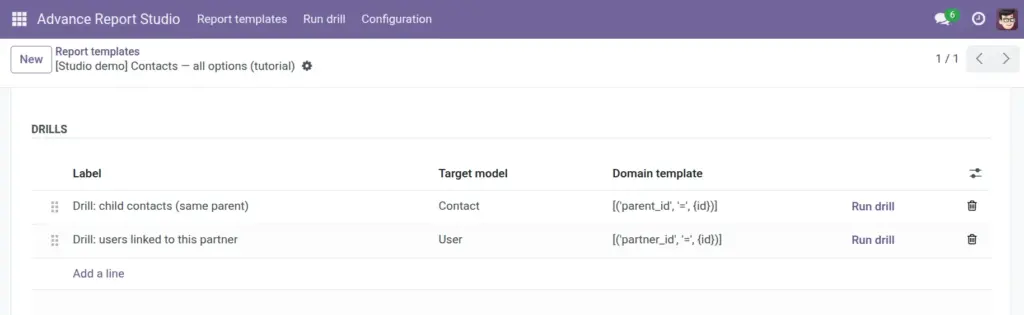
Jump from a report row to related records-order lines, child contacts, products, stock-using domain templates and placeholders.
Overview
Drills (advance.report.drill) let users open another Odoo model filtered by values from the current source row. For example, from a sales order row open order lines, or from a contact open child contacts sharing the same parent.
Each drill has a Label (what users see), a Target model, and a Domain template containing placeholders like {id} or {partner_id} filled from the source record’s technical field names.
How it works
At runtime, the module reads the source record on the template model, substitutes placeholders into the domain template, evaluates with safe_eval, and opens a window action on the target model. Placeholders must use field names from the source model, not the target.
Managers test drills via Run drill on the drill line (opens a small wizard) or from the app menu Advance Report Studio → Run drill by choosing drill and entering a Source record ID.
Only users who may edit templates should define drills-the same trust level as writing domains.
Step-by-step
- On the template form, scroll to Drills.
- Add a line: enter Label (e.g. “Order lines”).
- Select Target model (e.g. Sales Order Line).
- Enter Domain template, e.g.
[('order_id', '=', {id})]when source is sale.order. - Set sequence if you have multiple drills (order in UI).
- Save template; click Run drill on the line, enter a valid source ID, confirm the opened list.
- From live report data, execute drills through your Odoo UI integration (runner or custom actions as deployed).
Drill fields reference
| Field | Description | Example |
|---|---|---|
Label |
User-visible drill name. |
Drill: customer (contact) |
Target model |
Model opened by drill. |
res.partner |
Domain template |
Domain list with {placeholders}. |
[(‘order_id’, ‘=’, {id})] |
Sequence |
Sort order among drills. |
10, 20 |
Source record ID |
ID on template model (runner wizard). |
42 |
Field explanations
Each block matches one row in the table above, in the same order.
Label
Char field on advance.report.drill (shown as “Label” in the UI): the human-readable drill name users see next to the action (e.g. “Drill: order lines”). Required and translatable.
Target model
Required many2one to ir.model for the model opened when the drill runs (e.g. sale.order.line). Must be a non-transient model; respect Studio Allowed models when a whitelist is configured.
Domain template
Text domain on the target model with placeholders {field_name} filled from the source row’s values (technical names on the template model only). Evaluated with safe_eval after substitution. Use Run drill on the line to test with a known source ID.
Sequence
Integer ordering of drill lines on the template; lower values appear first. Use drag handles in the tree to reorder.
Source record ID
Not stored on the drill record itself: this is the integer you enter on the transient advance.report.drill.runner wizard (Run drill button) or the app menu Run drill. It must be the database id of a real row in the template’s source model so placeholders resolve correctly.
Tips
- Tip: Copy drills from [Studio demo] Sales – orders (tutorial) before writing custom domains.
- Tip: Placeholders use technical source field names (
partner_id), not label text (customer). - Tip: Target model must be allowed in Studio whitelist when whitelist is enabled.
Common mistakes
- Common mistake: Using
{customer}instead of{partner_id}-substitution fails or returns wrong rows. - Common mistake: Referencing target-model field names in placeholders-only source template model fields are valid.
- Common mistake: Invalid domain syntax-validate with Run drill and a known record ID.
Image