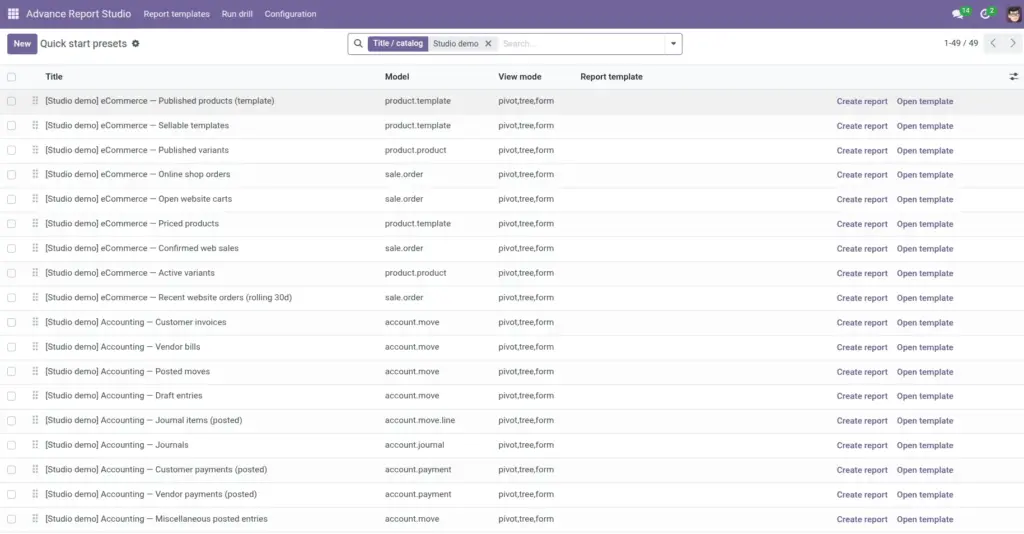
Learn from [Studio demo] tutorials, Quick start presets, and the extended catalog-materialized on demand when apps are installed.
Overview
Advance Report Studio ships learning content so you do not start from a blank form:
- [Studio demo] … (tutorial) templates – full examples with domain, pivot, columns, drills, and sometimes graph/kanban.
- Quick start presets – manager menu rows that create starter templates for common models.
- Studio catalog – large library of preset definitions (hundreds of report names across many models) materialized when you click create on a catalog preset.
Demos are created idempotently (by name)-installing Sales later can add sales demos without duplicating contacts demos.
How it works
On module load / registry hook, the system ensures base demos (Contacts) and optional demos when apps (sale, account, crm, stock, purchase, product) are installed. Models must pass Studio configuration whitelist when configured.
Quick start presets link to catalog entries or simple model suggestions. Create report on a preset row builds the real advance.report.template and links it back.
Module data may include sample [Studio demo] contacts (partners) so contact tutorials have recognizable rows.
Step-by-step
- Install Advance Report Studio and open Report templates.
- Search filter Studio demos to list tutorial templates.
- Open [Studio demo] Contacts – all options (tutorial) → Open data → explore Pivot, List, export, drills.
- Open [Studio demo] Contacts – graph & kanban (tutorial) for chart-first layout.
- Install Sales if needed; refresh-demos such as Sales – orders and orders this calendar month (rolling) appear.
- Managers: Configuration → Quick start presets → pick a preset → Create report.
- Duplicate via JSON export if you want a production copy without editing demos in place.
Built-in [Studio demo] tutorials (by app)
| Requires app | Example template names |
|---|---|
Base only |
Contacts – all options; graph & kanban; created this/last month (rolling) |
Sales |
Sales – orders; quotations; order lines; graph & kanban; this/last calendar month (rolling) |
CRM |
CRM – opportunities (tutorial) |
Invoicing (account) |
Invoicing – customer invoices (tutorial) |
Purchase |
Purchase – orders (tutorial) |
Inventory (stock) |
Inventory – stock moves (tutorial) |
Product |
Products – catalog (tutorial); stock quant drill if Inventory installed |
Concepts reference
| Term | Description |
|---|---|
Quick start preset |
Configuration row suggesting model/domain/views; creates template on demand. |
Studio catalog name |
Internal key linking preset to full catalog spec (266+ catalog report names in product materials). |
[Studio demo] prefix |
Identifies tutorial templates in search and training docs. |
Has template (filter) |
On presets list-whether create already ran. |
Field explanations
Concepts reference
Each block matches one row in the Concepts reference table, in order.
Quick start preset
Configuration row (advance.report.preset) suggesting a model, domain, and view setup. Managers click Create report to materialize a real advance.report.template on demand-presets are not silent bulk clutter at install.
Studio catalog name
Internal string on a preset linking to a large catalog specification (hundreds of named demo layouts in product materials). When set, creating the preset can build the full catalog report if the required module and model exist and pass the model whitelist.
[Studio demo] prefix
Naming convention for tutorial templates shipped or created by the module. Filter Report templates with Studio demos to list them; safe to duplicate via JSON for production copies.
Has template (filter)
Search filter on the Quick start presets list indicating whether Create report already ran and linked a generated advance.report.template to that preset row.
Built-in [Studio demo] tutorials (by app)
Each block matches one row in the “by app” table, in order.
Base only
Contact-centric demos (all options, graph & kanban, created this/last month rolling) require only the Base app. Sample [Studio demo] partners may ship in module data for readable charts.
Sales
Demos on sale.order and sale.order.line: orders, quotations, order lines, graph & kanban, and rolling this/last calendar month domains. Appear after the Sales app is installed and the model is allowed.
CRM
[Studio demo] CRM – opportunities (tutorial) on crm.lead when CRM is installed-pipeline-style domain, pivot, columns, and partner drill.
Invoicing (account)
Customer invoice / credit note demo on account.move when Invoicing (Accounting) is installed.
Purchase
Purchase order demo on purchase.order when Purchase is installed-vendor and line drills as in module data.
Inventory (stock)
Stock moves demo on stock.move when Inventory is installed.
Product
Product catalog demo on product.product when Product app paths exist; optional stock quant drill appears when Inventory is also installed.
Tips
- Tip: Install the business app (Sales, CRM, etc.) before expecting related demos-hook re-runs when apps appear.
- Tip: Duplicate demos (JSON export/import with new name) for production reports.
- Tip: From Settings, use Open quick start presets shortcut when rolling out to new teams.
Common mistakes
- Common mistake: Creating Sales catalog preset without Sales installed-wizard error or skipped row in bulk mode.
- Common mistake: Editing demo names in production-train on copies; keep demos for onboarding.
- Common mistake: Model blocked by whitelist-demo creation skipped silently or with configuration error.
Image