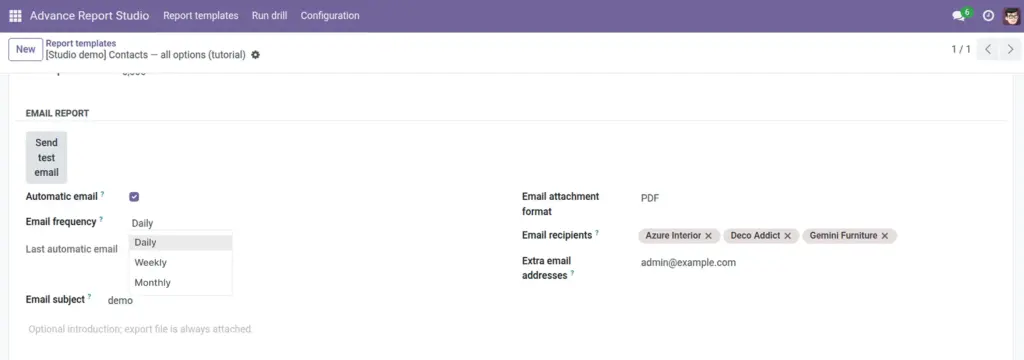
Send PDF, Excel, or CSV exports manually, test to yourself, or automate daily, weekly, and monthly delivery.
Overview
Each report template can email its export as an attachment. Recipients receive the same data as a download: current domain, export columns, and row cap. The module depends on Odoo Mail for outgoing messages.
Three delivery paths exist: Send by email (all configured recipients now), Send test email (only your user address), and Automatic email (scheduled job by frequency).
How it works
On send, the runtime builds an attachment in the selected format, creates a mail.mail record with subject and HTML body, and dispatches via Odoo mail. Email from resolves from template company email, else current user.
Scheduler behavior
- Daily – sends if at least ~20 hours since last successful send.
- Weekly – at least 7 days since last send.
- Monthly – at least 28 days since last send.
A cron job (cron_auto_send_report_emails) processes active templates with Automatic email enabled and at least one valid recipient. Last automatic email timestamp updates after success.
If no recipients or no sender address, scheduled sends are skipped (logged); manual send shows a user error.
Step-by-step
- Configure Odoo mail: company email and/or outgoing mail server (Settings).
- On the template, open Email report section.
- Set Email attachment format (PDF, Excel, or CSV).
- Add Email recipients (contacts with email) and/or Extra email addresses (comma or semicolon separated).
- Optional: customize Email subject and Email body (HTML). Empty subject defaults to “Advance report: {name}”.
- Click Send test email – verify attachment in your inbox only.
- Click Send by email from the header to deliver to all recipients once.
- To automate: enable Automatic email, choose Email frequency, save, and monitor Last automatic email.
Email fields reference
| Field | Description | Example |
|---|---|---|
Automatic email |
Enables cron-based sending. |
On for weekly KPI |
Email frequency |
Daily, weekly, monthly. |
Weekly |
Last automatic email |
Read-only last cron success time. |
2026-05-19 08:00 |
Email attachment format |
pdf, xlsx, or csv. |
PDF for executives |
Email recipients |
res.partner with email. |
CFO contact |
Extra email addresses |
Raw addresses not in contacts. |
|
Email subject |
Custom subject line. |
Weekly sales export |
Email body |
HTML introduction in message. |
Please review attached… |
Field explanations
Each block matches one row in the table above, in the same order.
Automatic email
Boolean on the template. When enabled, the scheduled server action periodically sends this template’s export to configured recipients after the selected Email frequency interval has elapsed since Last automatic email.
Email frequency
Selection: Daily (~20+ hours since last send), Weekly (7 days), or Monthly (28 days). Cron skips the template until the interval passes; requires at least one resolved recipient email.
Last automatic email
Read-only datetime updated after a successful automatic send. Use it to confirm the scheduler is firing and to debug “why didn’t I get last week’s mail?”.
Email attachment format
Required selection: PDF, Excel (XLSX), or CSV. Determines which export builder runs for both manual Send by email and automatic sends-the same columns and domain as other exports.
Email recipients
Many2many to res.partner with valid email addresses. Collected together with extra addresses; duplicates removed case-insensitively before sending.
Extra email addresses
Optional char field: raw addresses separated by commas or semicolons for people not stored as partners (e.g. shared mailbox [email protected]).
Email subject
Optional translatable char; if blank, the module uses a default subject such as “Advance report: {template name}”.
Email body
Optional translatable HTML (sanitized) shown above the attachment. If empty, a short default HTML body is generated mentioning the attachment format and company. Send test email prepends a test notice without notifying scheduled recipients.
Tips
- Tip: Always run Send test email after changing domain or columns-avoids broadcasting wrong data.
- Tip: Add at least one recipient before enabling automatic email-or cron silently skips the template.
- Tip: PDF attachments need wkhtmltopdf; Excel needs xlsxwriter-same as manual exports.
- Tip: Send by email and Send test email are header buttons (not table rows): test sends only to your user; Send by email delivers once to all configured recipients.
Common mistakes
- Common mistake: Automatic email on with empty recipients-scheduled job never sends.
- Common mistake: No company email / mail server-manual send errors, cron warnings in log.
- Common mistake: Expecting instant monthly send on day 1-scheduler waits 28 days after last send.
Image