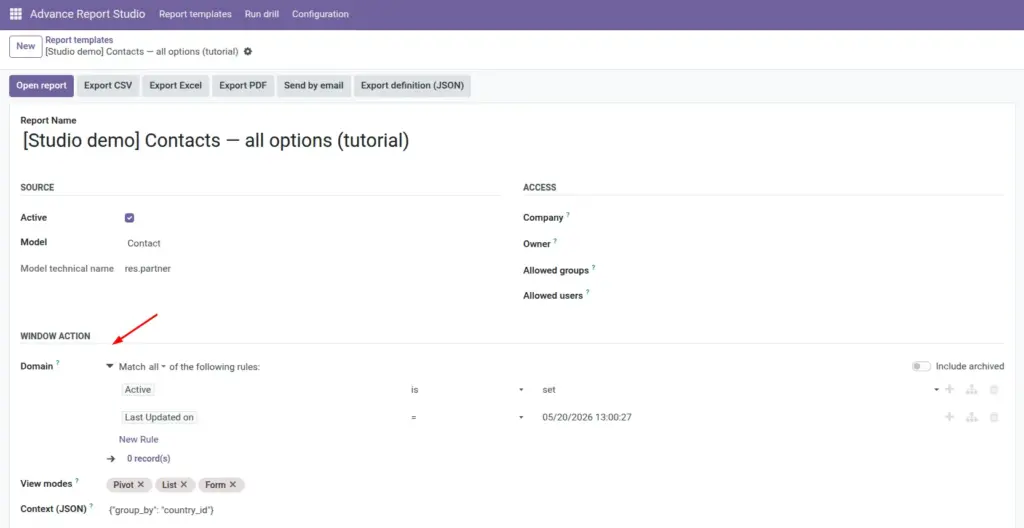
Control which records appear using Domain filters, rolling date windows, and optional JSON context.
Overview
The Domain field on each template decides which rows are loaded when you Open data, export files, or send email. It uses the same visual domain editor as elsewhere in Odoo (pick fields, operators, and values). The stored value is evaluated with safe_eval at runtime, so advanced templates can use Python helpers for rolling periods (this month, last month, etc.).
Optional Context (JSON) passes extra keys into the window action-commonly group_by for default grouping in list or graph views.
How it works
On save, the module validates that the domain expression parses and evaluates against the template model. At run time, advance.report.runtime evaluates the domain in the user’s environment (respecting record rules and company context), then opens or exports matching records.
Rolling date domains
Demo templates such as [Studio demo] Sales – orders this calendar month (rolling) store domains using datetime, dateutil.relativedelta, and server “today” so the window moves automatically-no manual date edits each month.
Context (JSON)
Must be a valid JSON object (e.g. {"group_by": "country_id"}). Invalid JSON blocks save. Context merges into the action when opening the report and can interact with pivot/graph settings.
Step-by-step
- Open the template form → Window action group.
- Click Domain and add rules (e.g. Status is not Cancelled).
- For relative dates, switch to code/expression mode and adapt a demo domain (this month / last month).
- Optional: set Context (JSON) for default group-by or search defaults.
- Save the template.
- Click Open report and confirm the record count and sample rows.
- Download CSV or Excel once to verify exports use the same filter.
Fields reference
| Field | Description | Example |
|---|---|---|
Domain |
Odoo domain list on the template model. |
[(‘state’,’!=’,’cancel’)] |
Context (JSON) |
Merged into action context. |
{“group_by”: “partner_id”} |
View modes |
Which views receive the filtered recordset. |
pivot, list, form |
Field explanations
Each block matches one row in the table above, in the same order.
Domain
Odoo domain list on the template’s source model: which records appear when you open or export the report. Stored as text, edited with the standard domain widget, validated on save. Rolling windows can use datetime, dateutil, and time in expressions when the stored value is evaluated as Python-copy patterns from [Studio demo] Sales – orders this calendar month (rolling) and related demos.
Context (JSON)
Valid JSON object merged into the window action when the report opens. Common uses include group_by for default list grouping and other action context keys your views expect. Invalid JSON prevents save; document non-obvious keys in the template Description.
View modes
Chosen on the same form as the domain (see Window action on the template). Decides which view types receive the filtered recordset (list, pivot, graph, etc.). The domain always applies first; view modes only control how those rows are displayed.
Tips
- Tip: Copy domains from[Studio demo]reports before writing expressions from scratch.
- Tip: Test after every change-empty domains often mean an overly strict AND chain.
- Tip: Pair “this month” and “last month” demos for month-over-month operational reporting.
- Tip: For rolling calendar months on a date field, copy the domain pattern from[Studio demo] Sales – orders this calendar month (rolling)(start of month ≤ date < start of next month, plus your business rules).
Common mistakes
- Common mistake: Domain so strict that zero rows appear-open the same model in standard Odoo and compare filters.
- Common mistake: Invalid JSON in Context-use double quotes and valid object syntax.
- Common mistake: Hard-coding calendar dates instead of rolling expressions-reports go stale every month.
Image