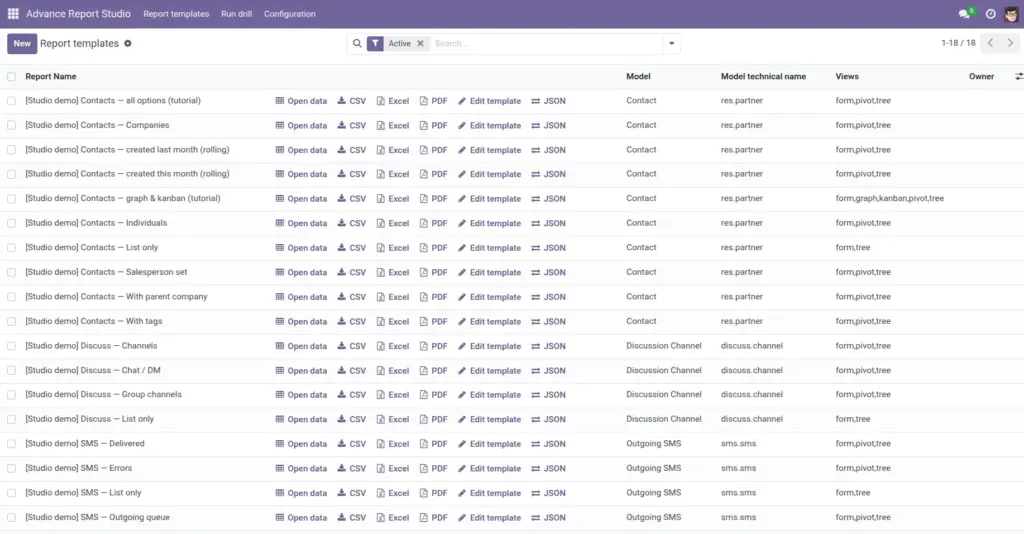
Use the Report templates list to open live data on screen or download CSV, Excel, and PDF-without opening the full setup form.
Overview
Report templates is the daily workspace for most users. Each row is one saved report. From this list you can open filtered data in Odoo, download files, or (if you are a Manager) edit the template or export its JSON definition.
Row actions use whatever domain, view modes, columns, and limits are already saved on the template-users do not re-enter filters each time.
How it works
When you click Open data, the module calls action_open_report, which builds a standard ir.actions.act_window: your domain is evaluated on the server, context JSON is merged, and the first configured view mode opens (often list or pivot).
CSV, Excel, and PDF buttons run separate server actions that query the same records and same export columns as the on-screen list, stopping at Max export rows. Excel uses xlsxwriter; PDF uses the module’s QWeb PDF report (company name and timestamp in the header).
List columns you may see
- Report Name, Model, optional Views summary
- Owner, Company (multi-company)
- Active (optional column)-archived templates can be filtered out
Search filters (power users)
Use filters such as Studio demos, My templates, Uses pivot/graph/kanban, Has drills, Has export columns, and group by Model or Owner to navigate large catalogs.
Step-by-step
- Go to Advance Report Studio → Report templates.
- Find your report (search by name, model, or use My templates).
- Click Open data (table icon) to open the report window in the main content area.
- Inside the report, switch view types (List, Pivot, Graph, Kanban, Calendar) if the template includes them.
- To download without opening: click CSV, Excel, or PDF on the same row-the browser downloads a file.
- Managers: click Edit template (pencil) to change domain, columns, or email settings.
- Managers: click JSON on the row to download a portable backup of the full definition.
Actions & fields reference
| Button / field | Description | Who |
|---|---|---|
Open data |
Opens live filtered data with configured views. |
All users |
CSV |
Downloads comma-separated file (UTF-8). |
All users |
Excel |
Downloads .xlsx workbook. |
All users |
Downloads tabular PDF with headers. |
All users |
|
Edit template |
Opens full configuration form. |
Managers only |
JSON |
Exports template definition for backup/migration. |
Managers only |
Open report |
Same as Open data, from the template form header. |
Managers on form |
Field explanations
Each block matches one row in the table above, in the same order.
Open data
List-row button (object action_open_report). Opens the template as a live Odoo action: same domain, view modes, context, and list columns as configured-no need to open the setup form first.
CSV
Downloads a UTF-8 comma-separated file for the current template using the same domain and export columns as Open data, capped by Max export rows.
Excel
Downloads an .xlsx workbook with the same rows and columns as CSV. Requires the xlsxwriter library on the Odoo server.
Downloads the module’s tabular PDF report (headers, model name, record count, then table). Uses the same column set and row cap as other exports; server needs wkhtmltopdf like other Odoo PDFs.
Edit template
Opens the full advance.report.template form (action_open_template_form). Visible only to Advance Report Managers; used to change domain, views, columns, drills, and email.
JSON
Downloads the portable template definition (format version 1) for backup or import on another database. Managers only; see Backup & Share (JSON).
Open report
Same behavior as Open data, but the button label on the template form header when a manager is editing the record. Useful to test immediately after saving changes.
Tips
- Tip: Exports always match Open data filters-if the on-screen list shows 500 rows, the export uses the same domain (capped by max rows).
- Tip: If a download stops early, raise Max export rows on the template (1-100000) or narrow the domain.
- Tip: Pivot layout in the UI does not carry into Excel/PDF-files are flat tables of export columns.
Common mistakes
- Common mistake: Expecting Excel to mirror pivot subtotals-the export is row-level data from the model, not a pivot snapshot.
- Common mistake: Clicking Edit template as a non-Manager-button is hidden; ask an administrator for Manager group.
- Common mistake: Running a template restricted by allowed groups/users-if you cannot see the row, you are not in the allowed set (see Who Can See Your Reports).
Image