A safe dry run that proves Odoo can talk to eTimeOffice before you depend on it.
Overview
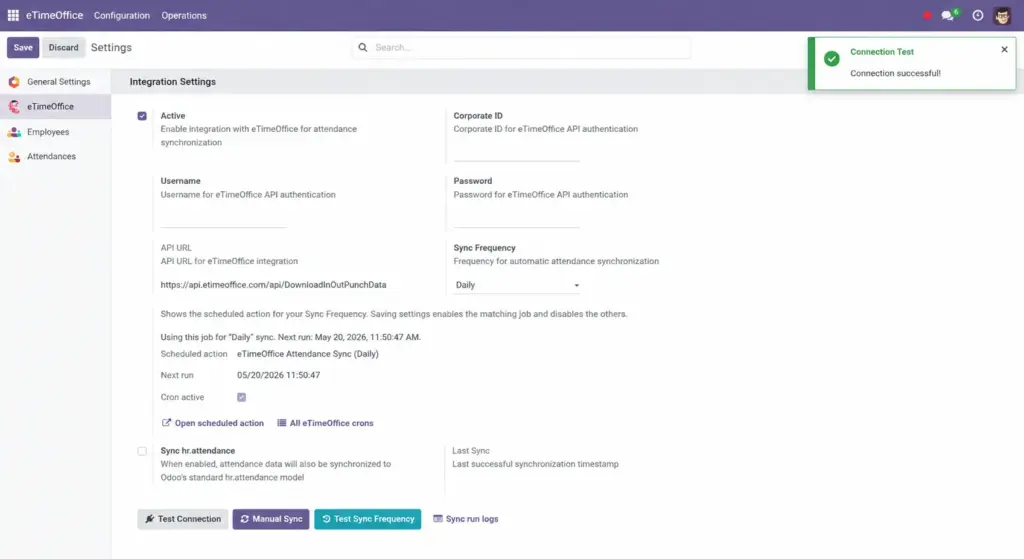
On the same settings screen where you entered your Corporate ID and password, Odoo offers a Test Connection button. It sends a tiny sample request to eTimeOffice and checks that the reply is healthy JSON. You get an on-screen notification with either a success message or the error text.
How it works
The test uses a short fixed date window and asks for all employee codes (ALL). It does not replace a full sync; it only proves authentication and network reachability. If the HTTP status is 200 and the body parses as JSON, you see “Connection successful.”
Step-by-step guide
- Ensure Active is on and credentials are filled.
- Click Test Connection.
- Read the pop-up title “Connection Test” and the message body.
- If it failed, copy the message to your IT partner or eTimeOffice support – it usually mentions wrong password, blocked IP, or invalid corporate ID.
Fields table
| Field / control | Description | Example |
|---|---|---|
Test Connection button |
Runs a one-off API call with your saved credentials. |
Green notice: Connection successful |
Notification message |
Plain text describing success or the error returned. |
|
Field explanations
Test Connection button
Safe to press anytime; it does not delete data.
Notification message
Treat it as the first line of diagnosis. “JSON parse error” sometimes means the server returned HTML (maintenance page) instead of data.
Tip: Run a connection test after every Odoo upgrade or firewall change, even if nothing else changed.
Common mistakes
- Testing while Active is still off-the test may still work depending on your version, but always align “active” with what you expect in production.
- Ignoring a warning because “sync used to work”-credentials can expire independently of Odoo.
Image