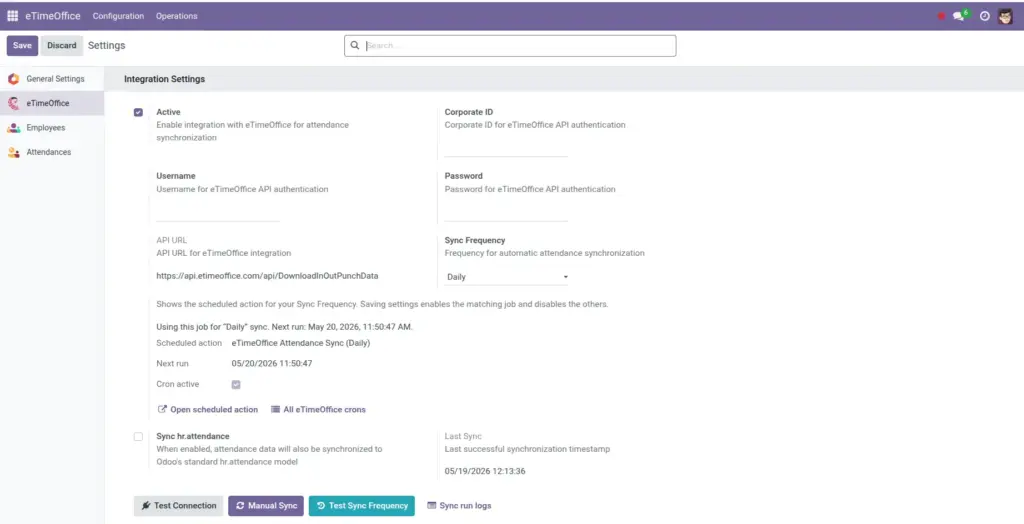
Mirror eTimeOffice punches into Odoo’s built-in HR attendance when your payroll team needs it.
Overview
Odoo already has its own attendance app used by kiosk mode and some reports. This integration normally keeps a separate, richer daily table. If you enable Sync hr.attendance on the eTimeOffice settings screen, every successful in/out pair for a linked employee also creates or updates that standard attendance line for the same calendar day.
How it works
During sync the module looks up the employee tied to the eTimeOffice user. If the toggle is on, it maps check-in and check-out into the fields payroll already knows. If a standard row already exists for that day, it updates it instead of duplicating.
Step-by-step guide
- Confirm every active worker is linked (see the chapter on matching staff).
- Open eTimeOffice → Configuration → Settings.
- Enable Sync hr.attendance (wording on screen: sync to standard HR attendance).
- Save, then run a manual sync for a short test week.
- Open Odoo’s normal Attendances menu and verify check-in/out times for a sample employee.
Fields table
| Field name | Description | Example |
|---|---|---|
Sync hr.attendance |
Master switch for mirroring into standard Odoo attendance. |
Enabled for payroll go-live |
Standard attendance check-in |
Odoo field filled from eTimeOffice first punch of the day. |
09:05 |
Standard attendance check-out |
Odoo field filled from eTimeOffice last punch. |
17:40 |
Field explanations
Sync hr.attendance
Leave off if you only want the dedicated eTimeOffice report list, or if another system already writes standard attendance.
Standard attendance check-in
The first clock-in of the day, copied into Odoo’s normal HR attendance screen when mirroring is on. Payroll apps that read standard attendance will see this value.
Standard attendance check-out
The last clock-out of the day in that same standard row. If only one punch exists, checkout may stay empty until the next sync brings the missing side.
Watch out: Turning this on without linking employees produces eTimeOffice rows but no mirrored standard rows-always link people first.
Common mistakes
- Expecting historical eTimeOffice rows to rewrite old standard attendance automatically-run a bounded manual sync for past periods if you need a backfill.
- Double data entry-if staff still use Odoo kiosk, decide which system is the “source of truth.”
Image