Connect your eTimeOffice time records to Odoo so HR sees the same clock times you already trust.
Overview
If your company uses eTimeOffice for badges, fingerprint readers, or web clock-ins, those systems already know when people arrived and left. This Odoo app asks eTimeOffice for that information on a schedule-or whenever you click sync-and stores one neat row per person per day inside Odoo.
Why it matters: your payroll team, managers, and auditors can work inside Odoo without retyping punch times from another website.
How it works
- You enter the same company login details in Odoo that eTimeOffice gave you for their cloud API.
- Odoo calls eTimeOffice and receives daily “in” and “out” times for each employee code.
- The app creates or updates people in the eTimeOffice Users list and writes Attendance Records with check-in, check-out, and total hours.
- If you turn on the extra option, the same times can also appear in Odoo’s normal HR attendance area.
Step-by-step guide
- Open eTimeOffice → Configuration → Settings (administrators only).
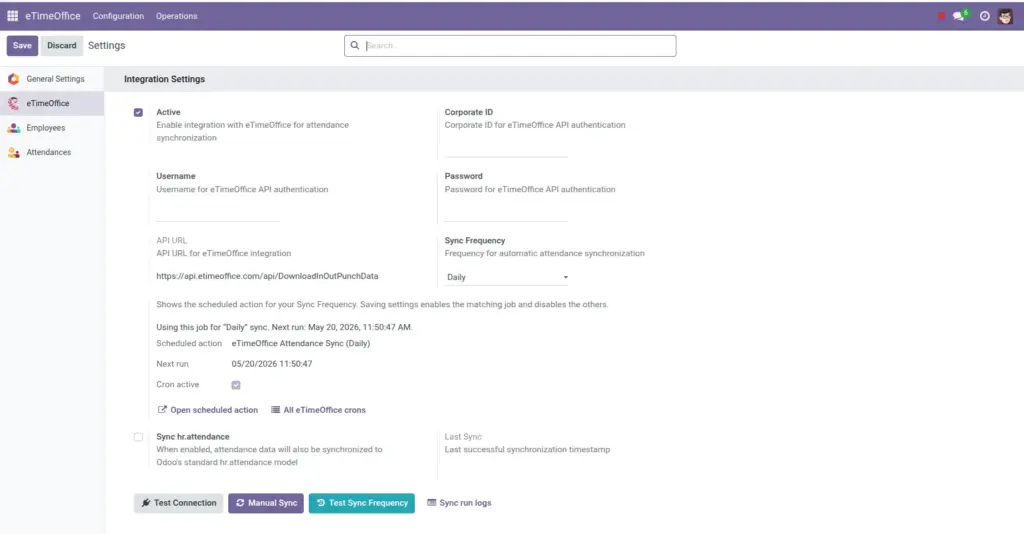
- Turn the integration on and fill in Corporate ID, username, and password from eTimeOffice.
- Click Test Connection to confirm the link works.
- Choose how often automatic sync should run, then save.
- Go to eTimeOffice → Operations → Users and link each person to the correct Odoo employee.
- Open Attendance Records to review imported days.
Fields table
This chapter introduces ideas rather than a single screen. When you open Settings under eTimeOffice, you will later see the fields listed in the chapter Your eTimeOffice sign-in in Odoo.
| Item | Description | Example |
|---|---|---|
Integration switch |
Master on/off for all automatic and manual pulls. |
On during live use; off while testing another server. |
Employee code |
The ID your clock uses for each person; must match eTimeOffice. |
1042 |
Daily attendance row |
One line per person per calendar day with first in and last out. |
Mon 12 Jan – In 09:02, Out 17:31 |
Field explanations
Integration switch
When it is off, scheduled jobs do nothing and manual sync explains that the link is disabled. Use it when you need a safe pause.
Employee code
This is not Odoo’s internal number; it is the code printed on reports from eTimeOffice. Matching codes is how punches land on the right person.
Daily attendance row
The app rolls multiple raw events into a single friendly day view so managers can scan a month quickly.
Tip: Keep eTimeOffice employee codes stable. If someone’s code changes in the hardware system, update the link in Odoo the same day to avoid gaps.
Common mistakes
- Expecting overnight history for years on the first run-start with a short date range using manual sync, then widen once results look right.
- Assuming “sync ran” means “every person is linked”-unlinked users still import, but they will not tie to an Odoo employee until you connect them.
Image