Overview
The knowledge base is a central library of reusable answers, guides, and FAQs that helps teams solve repeated issues quickly. It reduces dependency on individual memory and creates a consistent support experience for both agents and customers. Over time, a strong knowledge base improves resolution speed and lowers ticket volume for common questions.
How It Works
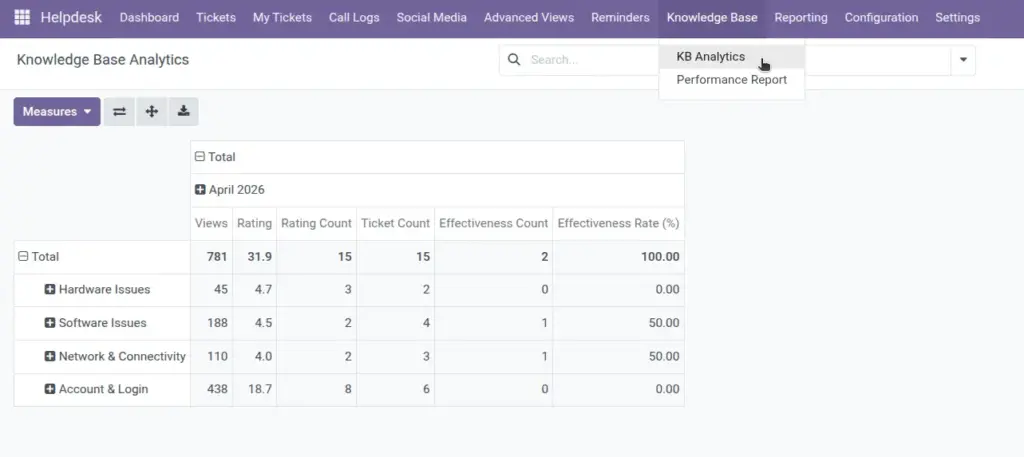
Articles are usually created in draft mode, reviewed for accuracy, and then published for team or portal use. Agents can link articles directly to tickets to guide customers with clear, repeatable solutions. Feedback, ratings, and usage trends help identify which articles are effective and which need updates.
Step-by-Step Guide
- Open Knowledge Base and click Create.
- Add title, article content, category, and tags.
- Set as FAQ if useful for common questions.
- Publish article after review.
- Link helpful articles to active tickets.
Fields Table
| Field Name | Description | Example |
|---|---|---|
Title |
Name of the article. |
How to reset account password |
Content |
Main instructions or explanation. |
Step-by-step reset process |
Status |
Publication state of article. |
Published |
Category |
Topic group for easier search. |
Account Access |
Is FAQ |
Marks article as frequently asked. |
Yes |
Linked Tickets |
Tickets associated with this article. |
12 linked tickets |
Fields Explanation
Title
Use customer-friendly language.
Content
Include clear steps with expected result.
Status
Publish only verified articles.
Category
Improves browsing and search speed.
Is FAQ
Highlights high-demand answers.
Linked Tickets
Shows where article was practically used.
Tips
- Create articles from solved tickets to save future effort.
- Review article ratings monthly.
- Use related articles to build a learning path.
Common Mistakes
- Publishing long articles without clear steps.
- Not updating old content after process changes.
- Skipping tags, which hurts discoverability.
Image