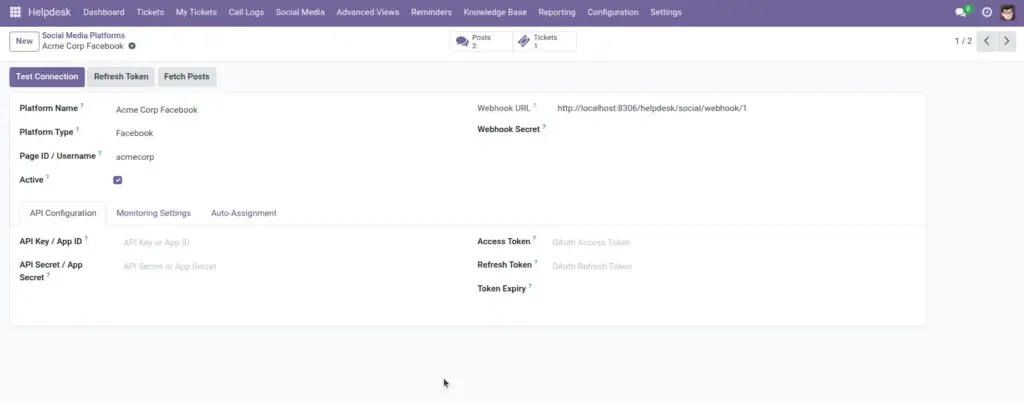
Overview
This chapter explains how to configure social channels so customer posts, comments, and direct messages are tracked as part of your support process. Proper setup helps teams react quickly to public complaints and private support requests before they become bigger issues. It also ensures social interactions are not missed during high traffic periods.
How It Works
Each social platform record can be configured to monitor specific interaction types such as posts, messages, comments, and mentions based on business needs. Incoming interactions are then reviewed and can be linked to existing tickets or converted into new tickets automatically or manually. This workflow connects social engagement with structured support operations and better reporting.
Step-by-Step Guide
- Go to Social Media > Platforms.
- Create platform record and set type.
- Enable monitoring options needed by your team.
- Test by posting a sample message.
- Check incoming posts and create or link tickets.
Fields Table
| Field Name | Description | Example |
|---|---|---|
Platform Name |
Name used internally for social source. |
Facebook Support Channel |
Platform Type |
Type of social platform. |
|
Monitor Posts |
Track public posts automatically. |
Enabled |
Monitor Messages |
Track private messages. |
Enabled |
Monitor Comments |
Track comments under posts. |
Enabled |
Status |
Platform connection activity state. |
Active |
Fields Explanation
Platform Name
Helps team recognize purpose quickly.
Platform Type
Sets source behavior rules.
Monitor Posts
Captures public concerns early.
Monitor Messages
Supports private customer requests.
Monitor Comments
Tracks thread-level complaints.
Status
Shows if monitoring is currently running.
Tips
- Start with one platform, then expand.
- Set response ownership before enabling monitoring.
- Review ignored posts weekly for missed issues.
Common Mistakes
- Enabling all monitoring options without team capacity.
- Not defining escalation path for viral complaints.
- Leaving inactive platform records in production.
Image