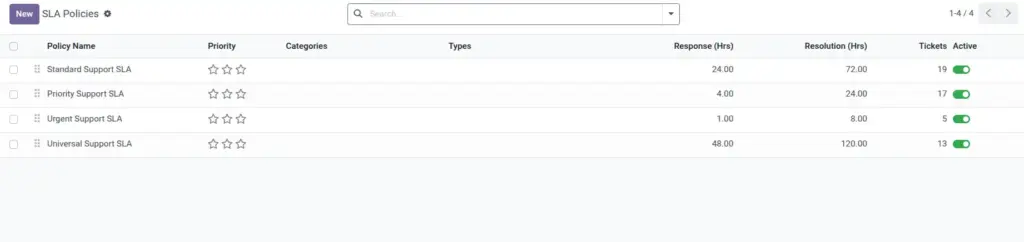
Overview
SLA and escalation settings help your team deliver support within promised service timelines and avoid customer dissatisfaction. These controls define how quickly your team should respond and resolve issues, especially for high-priority requests. When configured properly, they create predictable service quality and reduce the chance of missed commitments.
How It Works
An SLA policy is matched to tickets using business rules such as priority, category, ticket type, or team ownership. The system continuously monitors response and resolution deadlines and marks each ticket as met, at risk, or breached in real time. If configured, escalation actions notify higher support levels automatically when deadlines are close or already missed.
Step-by-Step Guide
- Go to Configuration > SLA Policies.
- Create policy name and define response and resolution hours.
- Set warning and escalation thresholds.
- Enable auto-escalation and choose escalation team or user.
- Assign policy to relevant tickets and monitor SLA views.
Fields Table
| Field Name | Description | Example |
|---|---|---|
Policy Name |
Name of the service commitment rule. |
Urgent Incident SLA |
Response Time (Hours) |
Maximum time allowed for first response. |
2.0 |
Resolution Time (Hours) |
Maximum time allowed to solve ticket. |
8.0 |
Response Status |
Current response deadline condition. |
At Risk |
Resolution Status |
Current resolution deadline condition. |
Met |
Auto-Escalate on Breach |
Automatically escalates overdue tickets. |
Enabled |
Fields Explanation
Policy Name
Keep names simple and business-based.
Response Time (Hours)
Measures first contact speed.
Resolution Time (Hours)
Measures full completion speed.
Response Status
Warns when first reply is delayed.
Resolution Status
Shows whether final target is safe.
Auto-Escalate on Breach
Sends tickets upward without manual action.
Tips
- Create separate SLA policies for normal and urgent tickets.
- Use warning thresholds so agents act before breach.
- Review breached tickets weekly for process fixes.
Common Mistakes
- Applying one SLA policy to all ticket types.
- Setting unrealistic response targets for low-priority tickets.
- Not defining escalation owner in advance.
Image