Overview
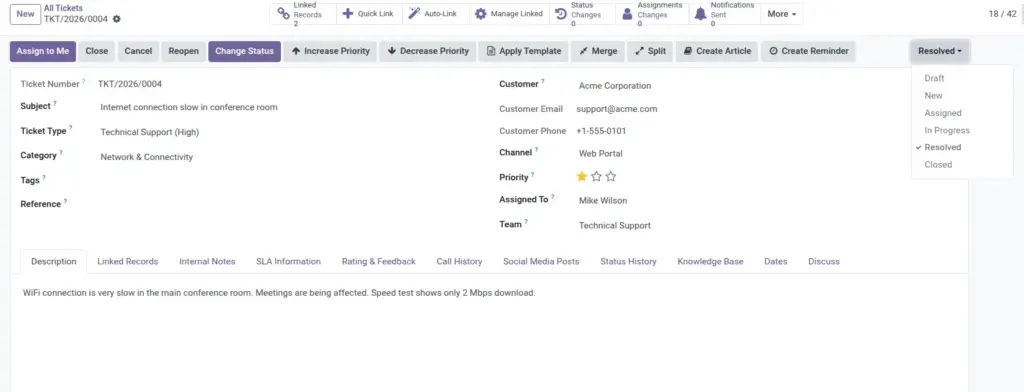
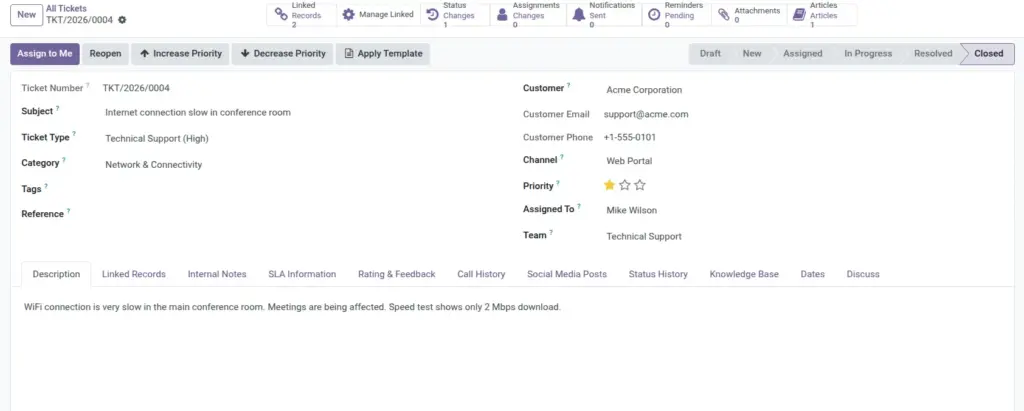
The ticket lifecycle is the core process that keeps support work organized, measurable, and customer-friendly. Every issue follows defined stages such as New, Assigned, In Progress, Resolved, and Closed, so everyone understands progress at any moment. When teams follow this lifecycle consistently, handovers become smoother, reporting becomes accurate, and customers receive clearer updates.
How It Works
A ticket is created when a customer issue is received through any channel, then routed to the right team or agent for action. As work continues, status is updated step by step, with notes, priorities, and follow-ups recorded in one place. Once the solution is delivered and verified, the ticket moves to Resolved and finally Closed, creating a complete history for future reference.
Step-by-Step Guide
- Open Tickets and click Create.
- Fill subject, customer, channel, and priority.
- Assign to an agent or team.
- Move status to In Progress while working.
- Add internal notes and customer updates.
- Set status to Resolved, then Closed.
Fields Table
| Field Name | Description | Example |
|---|---|---|
Subject |
Short title of the customer issue. |
Unable to reset account password. |
Ticket Number |
Unique system-generated reference. |
TIC/2026/0045 |
Status |
Current stage of work. |
In Progress |
Priority |
Urgency level used for sorting and SLA focus. |
Urgent |
Customer |
Person or company who reported the issue. |
BlueWave Logistics |
Channel |
Where the ticket came from. |
Fields Explanation
Subject
Keep it short and specific.
Ticket Number
Use this in all follow-ups
Status
Always update to reflect real progress.
Priority
Set honestly so urgent issues are not missed.
Customer
Links all communication to the right account.
Channel
Helps reporting show issue source trends.
Tips
- Write clear subjects so teammates can understand at a glance.
- Use Resolved before Closed to allow customer confirmation.
- Update status immediately after each major action.
Common Mistakes
- Leaving tickets in New after work has started.
- Using Urgent for normal requests.
- Closing tickets without a resolution note.
Image