Overview
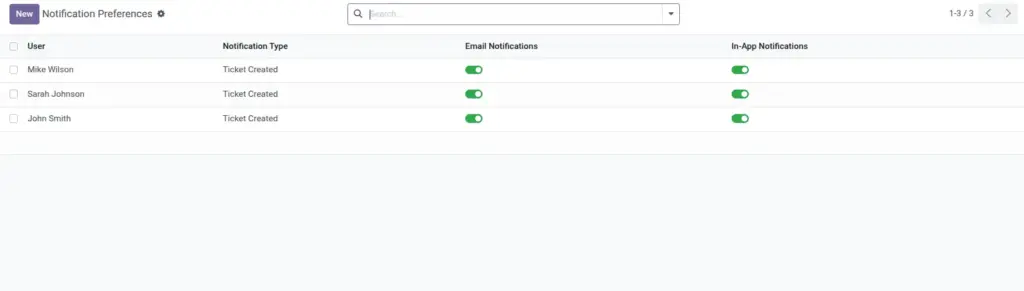
This chapter helps users manage alert settings so important updates are visible without creating notification overload. Good preference setup improves focus, reduces missed actions, and supports better work planning during busy schedules. It is especially useful for teams handling many tickets at the same time.
How It Works
Each user can choose which ticket events should trigger notifications and where those notifications should be delivered, such as email or in-app alerts. At the same time, managers can define common templates and schedules to keep communication style consistent across the organization. This combination balances personal control with business-level standardization.
Step-by-Step Guide
- Open Configuration > My Notification Preferences.
- Choose preferred channels (email, in-app).
- Select event types to receive.
- Save changes and test with a sample ticket update.
- Review monthly and adjust based on workload.
Fields Table
| Field Name | Description | Example |
|---|---|---|
Notification Channel |
Where user receives alerts. |
Email + In-App |
Ticket Assignment Alert |
Notifies when ticket is assigned. |
Enabled |
Status Change Alert |
Notifies when ticket stage changes. |
Enabled |
SLA Breach Alert |
Notifies when SLA is breached. |
Enabled |
Reminder Alert |
Notifies for scheduled reminders. |
Enabled |
Notification Template |
Message format used by system. |
Standard Helpdesk Alert |
Fields Explanation
Notification Channel
Lets users choose practical communication mode.
Ticket Assignment Alert
Prevents missed ownership.
Status Change Alert
Keeps stakeholders aligned.
SLA Breach Alert
Prioritizes urgent attention.
Reminder Alert
Supports follow-up discipline.
Notification Template
Makes messages clear and consistent.
Tips
- Keep SLA breach alerts always enabled.
- Use in-app alerts for frequent updates.
- Standardize templates for team clarity.
Common Mistakes
- Turning off assignment alerts.
- Using too many channels and missing key alerts.
- Not reviewing preferences after role changes.
Image