Overview
This area explains how to distribute tickets in a fair and practical way so no one is overloaded and no customer request is ignored. It helps managers and agents keep ownership clear, reduce delays, and improve teamwork during busy periods. A good assignment process also improves service quality because each issue reaches the right person faster.
How It Works
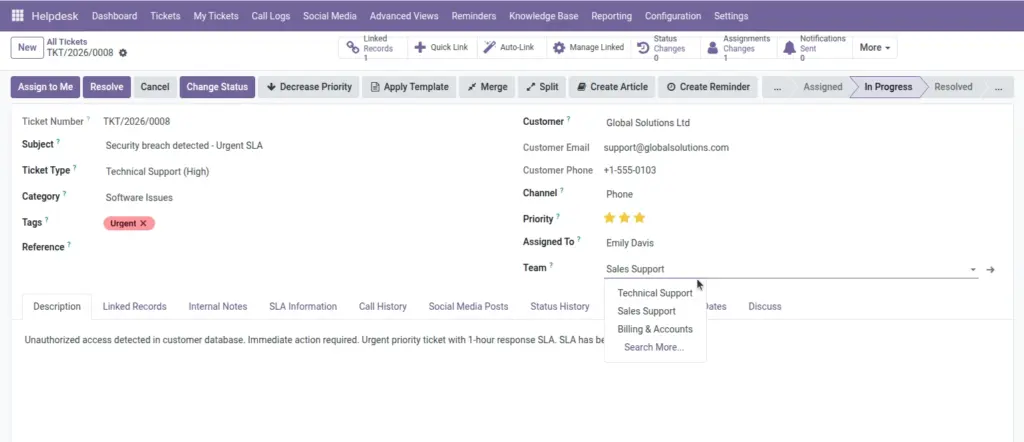
Each ticket is first linked to a team, then assigned to an individual agent who becomes responsible for follow-up and completion. Depending on your setup, assignment can be done manually by a manager or automatically using methods like round-robin and workload-based routing. Assignment history tracks who handled the ticket at each stage, which improves transparency and accountability.
Step-by-Step Guide
- Open a ticket and choose Team.
- Select Assigned To for the owner.
- Use Advanced Views > Agent Workload to check load.
- Reassign tickets if one user has too many urgent items.
- Review assignment history for audit and coaching.
Fields Table
| Field Name | Description | Example |
|---|---|---|
Assigned To |
User responsible for handling the ticket. |
Priya Sharma |
Team |
Team that owns the ticket. |
L1 Technical Support |
Assigned Date |
Date and time when assignment happened. |
15-Apr-2026 10:15 |
Team Members |
Users included in the team. |
8 support agents |
Auto-Assignment |
Option to assign tickets automatically. |
Enabled |
Assignment Algorithm |
Rule used for auto assignment. |
Workload-Based |
Fields Explanation
Assigned To
Shows clear ownership.
Team
Helps group work by skill area.
Assigned Date
Useful for SLA and productivity checks.
Team Members
Defines who can receive team tickets.
Auto-Assignment
Reduces manual routing effort.
Assignment Algorithm
Decides how tickets are distributed.
Tips
- Use workload-based assignment during peak hours.
- Review unassigned tickets every hour.
- Keep team member list updated when shifts change.
Common Mistakes
- Assigning tickets without setting team first.
- Keeping auto-assignment on with outdated team members.
- Not tracking reassignment patterns for root causes.