Overview
Quick note buttons are ready-made instructions that customers can tap while ordering, such as “No onions” or “Extra spicy”. Instead of typing every request manually, customers can select common choices in one tap, which makes ordering faster and reduces mistakes during busy hours.
This setup is useful for any restaurant that receives repeated custom requests. A clear button list also helps kitchen teams because note wording stays consistent from one order to another. In short, this feature improves order speed, note clarity, and overall customer experience.
How It Works
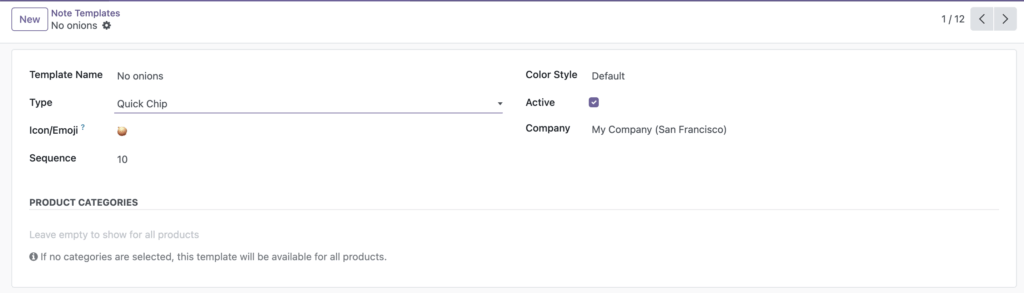
You create templates from the POS configuration area. Each template appears in the self-order cart as a button. When a customer taps a button, the note is added to the item’s special instructions.
Step-by-Step Guide
- Go to Point of Sale and open the Note Templates menu.
- Click Create.
- Enter a clear template name, for example “No onions”.
- Set Type to Quick Chip.
- Add an emoji in Icon/Emoji if you want visual help.
- Set sequence so popular notes appear first.
- Keep it active, then save.
Fields Table
| Field Name | Description | Example |
|---|---|---|
Template Name |
Text shown on the quick note button. |
No onions |
Type |
Decides whether this is a normal quick note or dietary tag. |
Quick Chip |
Icon/Emoji |
Optional visual icon before the text. |
🧅 |
Sequence |
Controls display order from first to last. |
10 |
Active |
Shows or hides this template in customer cart. |
Enabled |
Fields Explanation
Template Name
Use short phrases customers understand quickly.
Type
For this chapter, always choose Quick Chip.
Icon/Emoji
Optional, but useful to make buttons easier to scan.
Sequence
Lower numbers appear first, so put frequent requests at the top.
Active
Turn off old or seasonal notes without deleting them permanently.
Tips
- Keep note names under 2-3 words for quick reading.
- Start with your top 10 kitchen requests first.
- Use the same writing style across all templates.
Common Mistakes
- Creating very long note labels that are hard to tap on mobile.
- Using unclear wording like “special” instead of a direct instruction.
- Forgetting to keep important templates active after testing.
Image