Overview
Dietary and allergy tags are special note templates used for health-sensitive food requests. They are shown in a separate visual style so they stand out from normal preference notes, helping customers choose safely and quickly.
This is especially important when customers must avoid certain ingredients, like nuts or gluten. Clear tagging helps both front-desk and kitchen teams understand critical instructions without confusion, reducing the risk of missed dietary requirements.
How It Works
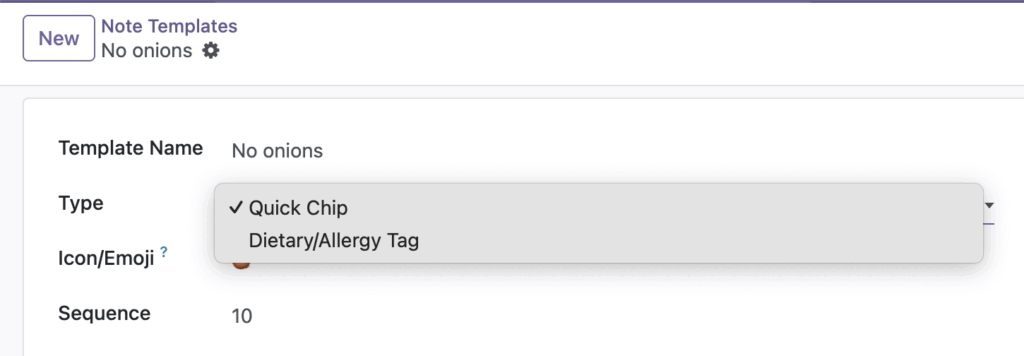
You create a template and set its type to Dietary/Allergy Tag. In the cart, tags appear as a dedicated group with strong colors to improve visibility.
Step-by-Step Guide
- Open Point of Sale > Note Templates.
- Create a new template.
- Set Template Name to items like “Vegetarian” or “Nut allergy”.
- Choose Type: Dietary/Allergy Tag.
- Set a Color Style that matches the request importance.
- Save and test in the self-order cart.
Fields Table
| Field Name | Description | Example |
|---|---|---|
Template Name |
Name of dietary or allergy tag shown to customer. |
Nut allergy |
Type |
Category of template behavior. |
Dietary/Allergy Tag |
Color Style |
Visual highlight style for the tag. |
Red (Allergy) |
Icon/Emoji |
Optional icon for faster recognition. |
🥜 |
Active |
Decides whether tag is currently available. |
Enabled |
Fields Explanation
Template Name
Keep the wording exact and safe, especially for allergens.
Type
Must be set to Dietary/Allergy Tag for this use case.
Color Style
Use red for allergy-sensitive labels to stand out the most.
Icon/Emoji
Helps customers understand choices quickly at a glance.
Active
Disable temporary options if they are not currently offered.
Tips
- Review allergy tags with kitchen staff before publishing.
- Use consistent wording across all menus and channels.
- Keep dietary tags separate from casual preference tags.
Common Mistakes
- Using unclear labels such as “No nuts maybe” for allergy needs.
- Selecting a light color style that does not stand out.
- Mixing preference labels and allergy labels under one wording style.
Image