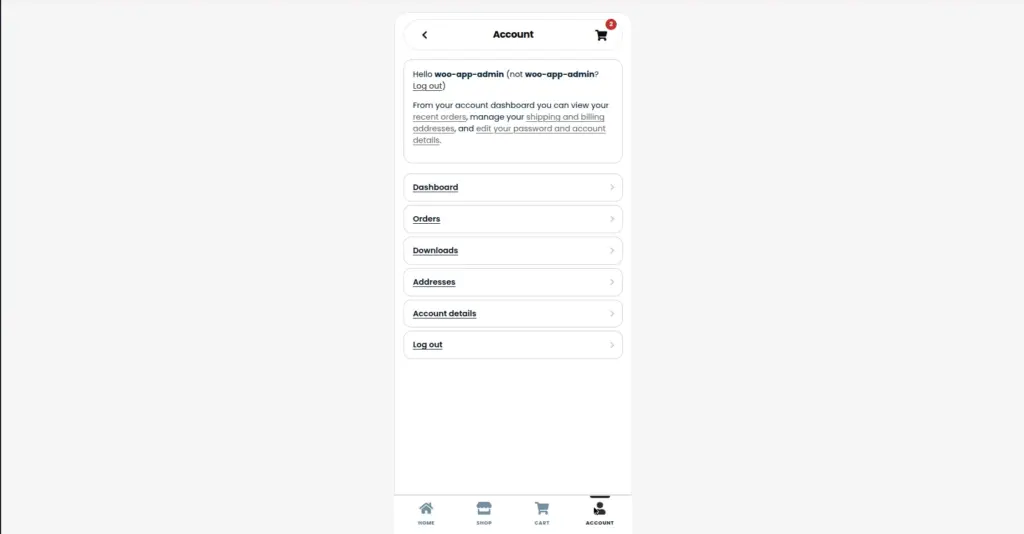
The My Account section lets customers log in, view their orders, manage their addresses, and update their profile – all inside the mobile app shell.
Overview
The My Account page works exactly like WooCommerce’s standard account area, but displayed inside the clean /app shell optimized for mobile. Customers access it at /app/my-account.
yoursite.com/app/my-account
| Section | URL | What Customers Can Do |
|---|---|---|
Dashboard |
/app/my-account |
Overview of account – quick links to orders, addresses, account details |
Orders |
/app/my-account/orders |
View all past orders, order status, and details |
View Order |
/app/my-account/view-order/[id] |
See full details of a specific order |
Addresses |
/app/my-account/edit-address |
Add or edit billing and shipping addresses |
Account Details |
/app/my-account/edit-account |
Change name, email address, and password |
Log Out |
/app/my-account |
Sign out of their account |
Login and Registration
If a customer is not logged in and visits /app/my-account, they will see a login form. They can enter their username/email and password to log in, or register for a new account if they don’t have one yet.
1. Customer taps "My Account" in the app
They land on the login page at /app/my-account with a username and password form.
2. Customer enters their credentials and logs in
After successful login, they are redirected to their account dashboard showing their account overview.
3. Customer navigates their account sections
They can tap links to view orders, edit their address, or update their account details – all staying inside the /app shell.
Order History
Customers can view all their past orders at /app/my-account/orders. Each order shows the order number, date, status (Processing, Completed, etc.), and total. They can tap any order to see its full details.
Order statuses (Pending, Processing, Completed, Cancelled, Refunded) are managed entirely in WooCommerce → Orders in your admin panel. The app simply displays whatever status you have set.
Tips
- Enable account creation at checkout in WooCommerce settings – this encourages mobile shoppers to create accounts during purchase so they can track orders in the app.
- Update order status promptly in WooCommerce when orders are shipped – customers checking the app will see “Completed” or “Shipped” status, which builds trust.
- Enable WooCommerce email notifications for order status changes – customers receive emails automatically when their order status updates.
Image