Overview
This page explains who can do what in the Profit / Loss module. It helps you quickly answer: “Why can I see Client Costs but not Profit/Loss totals?” or “Why can’t I open the Profit/Loss Graph?”
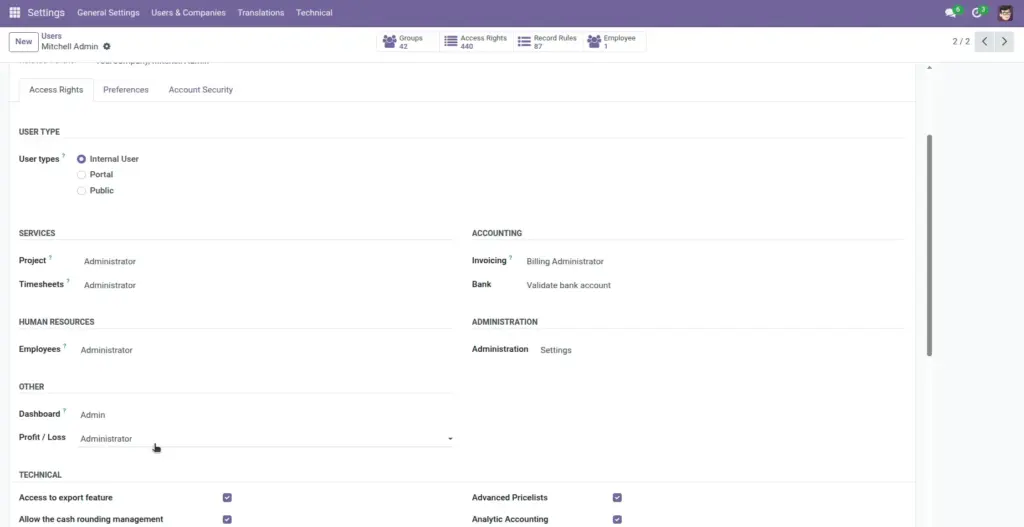
There are two roles under the Profit / Loss category: User and Administrator. Your role changes what you can see in Projects, and it can also limit what shows up in lists and reports.
Real-life example: a project coordinator enters client payments and vendor bills (User role), while a finance owner reviews profit trends and compares projects (Administrator role).
How it works
- User: can work with Client Costs and External Expenses and typically only sees the records they created.
- Administrator: can see Profit/Loss totals on projects and can access the Profit/Loss Graph report.
- Why this matters: it prevents accidental edits and keeps margins visible to the right people.
Step-by-step guide
- Check your roleAsk your Odoo administrator which Profit / Loss role you have (User or Administrator).
- Confirm the menus you can accessIn Odoo Projects, look for a menu called Profit / Loss. Users typically see Client Costs and External Expense.
- Confirm what you can see in a ProjectOpen any project. Administrators see Profit/Loss totals; Users may only see the entry tabs.
Fields table
| Field Name | Description | Example |
|---|---|---|
User role |
Lets you add Client Costs and External Expenses. You usually only see the items you created. |
A team lead logs payments and vendor bills for their own projects. |
Administrator role |
Shows profit/loss totals on projects and provides the Profit/Loss Graph report. |
A finance owner reviews which projects are profitable this month. |
“My records only” visibility |
In the Client Costs and External Expense lists, Users commonly see only their own entries. |
You don’t see another department’s entries unless you created them. |
Field name explanations
User role
Use this role when you need to enter project money details (payments and expenses) without seeing all company margins.
Administrator role
Use this role when you are responsible for profitability and need to compare projects.
“My records only” visibility
This keeps lists clean. If you can’t find an entry, it may have been created by someone else.
Tips
- Agree on ownership: decide who enters client payments and external expenses for each project.
- Use consistent descriptions: short, clear descriptions help finance reconcile items later.
- Keep statuses honest: mark items “Paid” only when money has actually moved.
Common mistakes
- “I can’t see the Profit/Loss Graph”: that report is restricted to Administrators.
- “I can’t find an entry I know exists”: Users commonly only see entries they created.
- Giving everyone Admin access: it can create confusion and accidental changes.
Image