Overview
This page gives you a simple weekly routine to keep Profit/Loss accurate and useful. Without a routine, Profit/Loss often becomes “a number we look at too late” and then it’s hard to fix.
A 15–30 minute weekly check is usually enough to catch the biggest issues: payments that should be marked Paid, expenses linked to the wrong project, and missing timesheets.
Real-life example: every Monday, a project manager reviews the 3 worst projects. Two turn out to be “false losses” caused by Unpaid payments, and one needs a scope conversation.
How it works
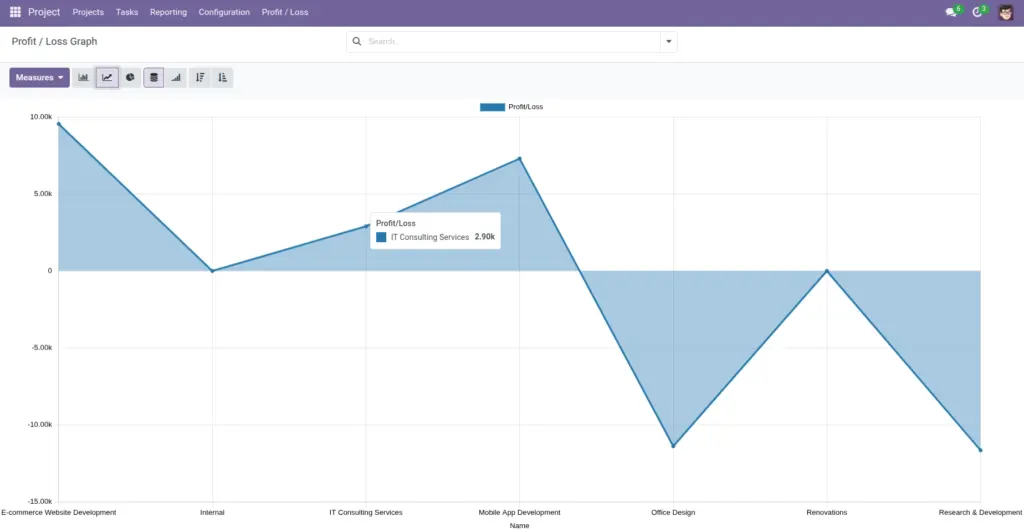
- Start wide: use the Profit/Loss Graph to spot outliers.
- Then go deep: open the project and review the tabs that explain the number.
- Finish with actions: update statuses, fix wrong links, and assign follow-ups.
Step-by-step guide
Open the Profit/Loss Graph
Go to Projects → Reporting → Profit/Loss Graph (Administrator access is usually required).
Pick 3–5 projects to review
Choose projects that are negative, dropping week-over-week, or unusually high (sometimes that means something is missing).
Open each project and confirm the “why”
In the project, check: Client Cost (paid revenue), Employee Expense (time cost), and External Expenses (out-of-pocket spend).
Fix the quick wins
Update client payments that should be Paid, correct any expenses linked to the wrong project, and ensure timesheets were logged.
Write 1 action per “problem project”
Example actions: “Follow up on unpaid milestone invoice”, “Cap external spend this month”, “Re-estimate scope”.
Fields table
| Field Name | Description | Example |
|---|---|---|
Projects to review |
The short list of projects you look at every week. |
“Top 3 losses + top 2 profits” |
Payment follow-ups |
Unpaid client payments that need chasing or updating to Paid. |
“Milestone 2 invoice sent, payment received? Update status.” |
Cost drivers |
The biggest items driving costs (time or external spend). |
“QA week doubled hours; new tool license added.” |
Field name explanations
Projects to review
Keeping a short list prevents overwhelm. Focus on the projects that can most impact your month.
Payment follow-ups
Many “loss” situations are actually “payment not marked Paid yet”. Fixing status can correct the picture instantly.
Cost drivers
This is where you find the story: too many hours, unexpected vendors, or planned spend that needs approval.
Tips
- Schedule it: put a recurring calendar event. Profit/Loss helps only when it’s reviewed.
- Use consistent rules: always treat “Paid” as “money received”, not “invoice sent”.
- Keep notes short: one sentence per project is enough to guide next steps.
Common mistakes
- Reviewing once a month: by the time you notice a problem, it may be too late to change it.
- Ignoring timesheets: missing timesheets can make profit look better than reality, then “suddenly” drop later.
- No follow-up owner: if an action has no owner, it usually never happens.
Image